Release Date | July 7, 2026 |
Release Status | Released |
Issues | 1 item |
Summary | SEQTA Analyse Improvements |
Issue Type | Issue Key | Summary | Module/Program | Comment | Service Desk Reference Number(s) |
| Improvement | PRD-1899 | SEQTA Analyse Improvements | SEQTA Analyse | SEQTA Analyse will receive a refreshed user experience, including a cleaner and more modern interface, enhanced security and performance. The features you rely on are all still there, and you will notice some elements have moved for consistency and accessibility. | N/A |
| Improvement | SEQ-1047 | Remove SEQTA contextual help widget and uplift KB button | SEQTA Core | N/A | N/A |
SEQTA Analyse Upgrade
SEQTA Analyse is being upgraded from Jasper Reports Server version 7.x to Jasper Reports Version 10.x.
The upgrade is necessary to address identified Common Vulnerability and Exposures fixed by Tibco, the parent company of Jasper Reports Server. Please refer directly to Tibco site for full details on these fixes.
Below is a list of the features that have also been affected by this upgrade. At the time of deployment, SEQTA Analyse will include the feature changes, provided as-is by Tibco, unless a feature could compromise the school user experience.
Whilst you may experience some change in the look and feel, we have not identified any features that will diminish the services that you have in SEQTA Analyse already.
SEQTA Analyse (Jasper Reports Server) Version Upgrades – Feature changes
New Feature | Description |
Settings Panel | New settings panel dedicated to formatting and properties in Ad Hoc View and Dashboard designers. |
Hyperlinks (Dashlet Settings) | Added for Ad Hoc View Dashlets in Dashboards. |
Replace Dashlet action | Replace dashlet has been added to the Hyperlinks options in Dashlet Settings. This enables a dashlet to be replaced with another Ad Hoc View, Report, or Report Option. |
Dashboard Export | Allows Dashboards to be exported as a screenshot or in detailed mode. |
Drill Up and Down the Charts | For charts containing hierarchical data, allows users to drill up and down the charts by clicking a data point e.g. from a higher level of data to a granular level. |
New Hyperlink Type called dashlet | Allows integration with other dashlets by linking them as parameters. |
New Date Time calculations | Added calculations such as "Year to Date", "Period to Period", and "Period over Period" and the ability to set the Fiscal Year start. (To support these calculations, the date grouping function Quarter and Month was renamed to Quarter and Year and the date grouping function Month was renamed to Month and Year. The new date grouping function of Quarter and Month now groups only by quarter or only by month). |
View Schedule Status | Ability to view the status of scheduled jobs in the Status column of the Schedules page. |
Show/Hide Visualisation Selector | Ability to set whether the visualisation type selector will be shown when a new Ad Hoc View dashlet is created. |
‘Always prompt’ | Ability to set ‘Always prompt' when a new Ad Hoc View dashlet is created, so that the user running the report is prompted to input controls. |
Ad Hoc Component in Reports | Modifications made to the parent Ad Hoc View are automatically reflected in the Ad Hoc Reports. |
Enhanced Tooltip for Fields & Measures | Tooltip provides comprehensive field information including Field Path, Original Name, Formula, Description, Data Type, Field Type, and Default Summary Function for all available fields/measures. |
Ad Hoc Views Layout Band | Redesigned to dynamically adapt to each visualization type, presenting specific areas for fields and measures that directly correspond to how the visualization is constructed, including tooltips for guidance. |
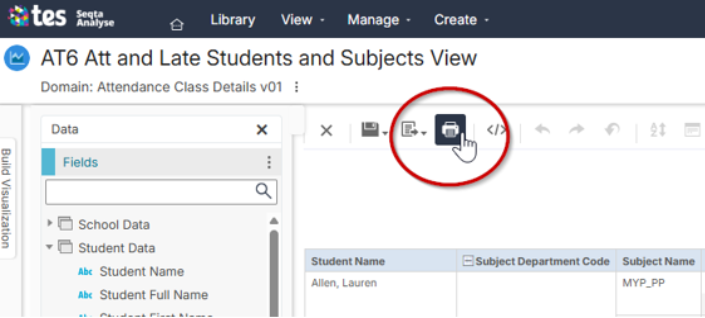
Print Button Location | Print reports, dashboards and ad hoc views directly from the toolbars. For dashboards, visibility of the print button is configurable (both for the entire dashboard and individual dashlets), offering "screenshot" or "detailed" print options.
|
Visual Indicator of Filters/Dashlets | Highlights affected dashlets when you are editing a dashboard and select a filter. |
Edit external Ad Hoc View from Dashboard | Ability to modify existing Ad Hoc Views from within your Dashboard. |
Accessibility Changes | Navigation and user interface improvements in some areas of the Ad Hoc View designer and the Input Controls dialog. |
Enhanced HTML Formatting | Ability to embed more HTML content (including layout, tables, and images) into reports. |
Input Controls | Ability to customise the label for input controls. Ability to Enable/Disable and Show/Hide Input Controls based on a condition (Custom Expression). |
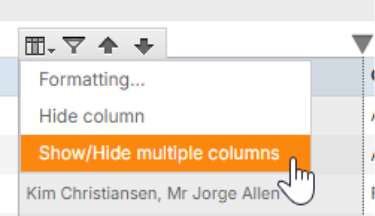
Show/Hide Multiple Columns | Ability to show or hide multiple columns when viewing a report.
|
The above items are those identified that will affect SEQTA Analyse workflows. Whilst other features of the server upgrade affect the internal processes of the server, these are not listed here. For further details on this, please refer to the Tibco site regarding Jasper Server Version 10.x upgrades.
Schools are reminded that whilst a feature may be available in Tibco: Jasper Reports Server, it may not be supported by the SEQTA Analyse support teams, due to the integration with SEQTA Teach.
The supported features, are those for which a school has completed SEQTA Analyse Training, and available in the Training manual, and purchased developments which have been created by the SEQTA Analyse Support team.
Was this article helpful?
That’s Great!
Thank you for your feedback
Sorry! We couldn't be helpful
Thank you for your feedback
Feedback sent
We appreciate your effort and will try to fix the article