TABLE OF CONTENTS
- Creating and Managing General Forums
- Creating and Managing Assessment Forums
- Moderating Forums
- Un-Banning, Removing and Adding Participants to a Forum
- Disabling / Suppressing Forum Notifications
- Closing and Reopening Forums
By default, teachers have access to create and moderate their own forums. Staff with the Permission 'FORUM:ALL' allows staff to view all forums. The permission 'FORUM:ADMIN' allows a staff member to access, manage and moderate all forums.
Creating and Managing General Forums
- Go to the Teaching Workspace > Forums.
- Select 'New forum...' to create a Forum. Alternatively, click on the 'Edit' icon next to the forum name to make changes to an existing forum.
- Set up the forum entering a Title, Participants and Content.
- Click 'Save'.
Creating and Managing Assessment Forums
Teachers can create Forums for an assessment through their programme through the 'Overview of Assessments' page.
- Go to the Teaching Workspace > Timetable > My Classes.
- Click the on the class or the Load Programme icon.
- Select the Overview of Assessments.
- Select the Assessment, then scroll down and click on Add Linked Forum.
- Set up the forum entering a Title, Participants and Content. Or leave with default setup.
- Click 'Save'.
Moderating Forums
- Access the forum either through the Teaching Workspace > Forums. Alternatively, go to the Programme page under Overview of Assessments (Assessment forums only).
- Select the forum name.
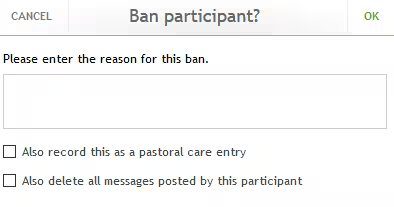
- Where participants have commented on forums, the following actions can be taken by clicking on the icons above the comment:
- New Message (Direqt)
- Ban This Participant
- Delete Message
Un-Banning, Removing and Adding Participants to a Forum
Re-adding a person as a participant will also 'Un-ban' that person.
- Access the forum either through the Teaching Workspace > Forums. Alternatively, go to the Programme page under Overview of Assessments (Assessment forums only).
- Click on the 'Edit' icon next to the forum name.
- To add a participant select their name from the drop-down. To remove a participant click on the broom icon.
- Click 'Save'.
Disabling / Suppressing Forum Notifications
- Access the forum either through the Teaching Workspace > Forums. Alternatively, go to the Programme page under Overview of Assessments (Assessment forums only).
- Select the forum.
- Click the 'Suppress Notifications' button.
Closing and Reopening Forums
- Access the forum either through the Teaching Workspace > Forums. Alternatively, go to the Programme page under Overview of Assessments (Assessment forums only).
- Select 'Show Closed Forums' from the bottom of the Forums list
- Click the 'Close Forum' icon next to the forum name. Alternatively, click the 'Reopen Forum' icon (curly arrow) to make the forum active again.
Was this article helpful?
That’s Great!
Thank you for your feedback
Sorry! We couldn't be helpful
Thank you for your feedback
Feedback sent
We appreciate your effort and will try to fix the article