Why are there students missing from the Attendance statistics export (CSV) under Academic reports?
The student has no contacts flagged for postal mail. As the report includes the postal address it requires a contact to be flagged for mail. The Enable mail checkbox should be ticked which will display the MAIL badge in the SIP.
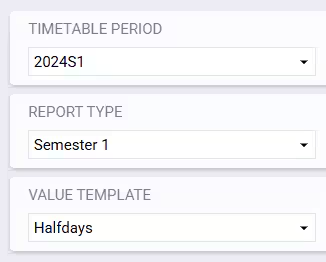
This can also occur if the student has no data in a Values template under the selected Timetable period and Report type. To check this look in the Report Editor.
Why do the Attendance solutions reports sometimes not include all attendance solutions for the day?
As with the majority of attendance reports, unless it specifically has linear view in the title, the system uses period view. This includes the Attendance solutions (CSV) report.
The report has logic for attendance period matching, so it will find the attendance best suited to the period (typically anything over 50% of the period will be the solution that is displayed).
Does the Incomplete roll report display the relief teacher's name?
No, the Incomplete roll Report only displays the name of the timetabled class teacher.
Why has the attendance report I have run not completed?
This issue is typically a result of a report being run that needs to return too much data. Please refer to the article Resolving issues with attendance reports not completing for detailed information on identifying and resolving attendance report issues.
Why are the attendance percentage calculations for the Class statistics report and Roll page/Marks book Different?
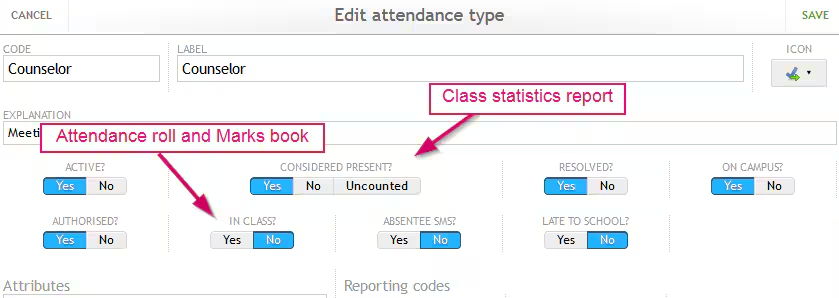
The attendance percentage in the Marks book and Attendance roll page are determined based on a setting in the Attendance types called In class. In the Class statistics report, attendance percentage is determined based on the setting in the Attendance types called Considered present.
Was this article helpful?
That’s Great!
Thank you for your feedback
Sorry! We couldn't be helpful
Thank you for your feedback
Feedback sent
We appreciate your effort and will try to fix the article