TABLE OF CONTENTS
- Preschool Reform Agreement (PRA) report
- Details on calculations for students with non-normal enrolments
Preschool Reform Agreement (PRA) report
The Preschool Reform Agreement has been put in place to “strengthen the delivery of preschool, [and] better prepare children for the first year of school.” To this end, schools offering a preschool program need to report on the data points monitored and indicative of this agreement.
The Preschool Reform Agreement report in SEQTA captures the data required and delivers it for export in the format requested by DoE WA.
The report can be accessed in Attendance Administration > Reporting > Preschool Reform Agreement (CSV)
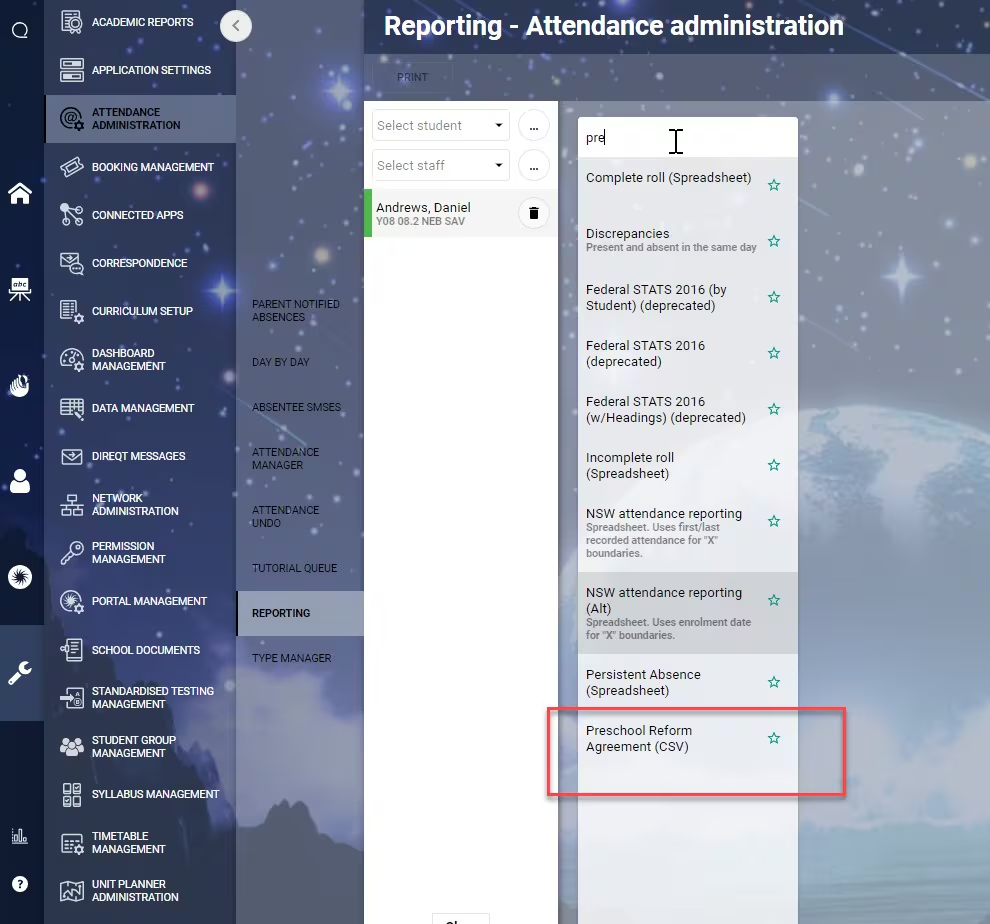
When accessing the report, select the students to be reported on, and enter the date range that the report should cover. This is your reporting period and should be equal to the dates of your school’s Term 2.
Select the students
Select the date range
Click “Print”
- Open the exported file and complete the following fields, referencing their description below:
- SchoolWeeks
- QualStaff
- StudRepeat
- TermClosure
- TermPupilFree
- TermPubHol
- Fix any other issues reported when exporting
- Submit the report to your jurisdiction
| Report Field Name | Manually entered? | Description |
|---|---|---|
| Year | The Year that the report is being run in. This calculates off the current date | |
| Term | This is always reported as 2 | |
| SchoolCode | This is the school’s Government ID as it is stored within SEQTA | |
| SchoolName | This is the school’s Name as it is stored within SEQTA | |
| SchoolWeeks | Yes | The number of teaching weeks in the entire year of the reporting period |
| QualStaff | Yes | Flag to determine if the staff member taking the roll is a qualified staff member Enter manually (Y/N) |
| StudFirstName | Student’s first name | |
| StudLastName | Student’s surname | |
| StudDOB | Student’s Date of Birth | |
| StudGender | Student’s Gender (M, F, X or N (if not stated)) | |
| StudIndig | Student’s Indigenous Status (1 = Aboriginal, 2 = Torres Strait Islander, 3 = Both Aboriginal and Torres Strait Islander, 4 = Not Aboriginal or Torres Strait Islander, 9 = Not stated) | |
| StudAddr | Student’s primary residential address | |
| StudTown | Student’s town | |
| StudState | Student’s State | |
| StudPcode | Student’s Postcode | |
| StudYearLevel | Student’s year level, which the report will autopopulate with KIN to indicate they are Kindergarten students | |
| StudRepeat | Yes | Flag to indicate a student is repeating the year Enter manually (Y/N) |
| StudEnrol | Date the Student was enrolled in the school | |
| StudLeave | Date the Student exited the school | |
| SessionsTotal | Total number of sessions available to students between the report dates | |
| SessionAvgHours | The average number of hours per session available through the program, shown in hours | |
| SessionsAvail | The number of sessions available to a Student, based on their enrolment date and the exiting date (if before the end of the reporting period) | |
| SessionsAttend | Number of sessions attended, where the session is counted if more than 0 minutes were attended | |
| TermStart | The report start date | |
| TermEnd | The report end date | |
| TermClosure | Yes | Number of sessions in which the school was closed for safety reasons (eg COVID, fire etc) where the student would normally have attended |
| TermPupilFree | Yes | Number of sessions on Pupil Free Days that fall within the reporting period where the student would normally have attended |
| TermPubHol | Yes | Number of sessions on Public Holidays that fall within the reporting period where the student would normally have attended |
Details on calculations for students with non-normal enrolments
It is important to note that some schools may offer their students a variety of attendance patterns, and that students may move between these patterns during the reporting period.
For example: Student A attends morning sessions with Teacher X on Monday, Wednesday and Thursday. Student A also does a full day (2 sessions) with Teacher W on Tuesdays. Half way through the term they reduce their time to only Wednesday morning sessions.
The Preschool Reform Agreement report in SEQTA will automatically calculate the Sessions Total, Sessions Available and Sessions Attended based on the student’s class enrolment and class attendance data. This includes the following non-normal enrolment scenarios:
- students that are in multiple Kindergarten classes
- students that change between Kindergarten classes
- students that enrolled after the start of the reporting period
- students that unenrolled before the end of the reporting period
- students that have a gap within the reporting period where they were unenrolled
Before or after a student's enrolment period, Sessions Total will match the students first enrolment pattern for the reporting period before enrolment, and their final enrolment pattern for the reporting period after they are unenrolled.
Was this article helpful?
That’s Great!
Thank you for your feedback
Sorry! We couldn't be helpful
Thank you for your feedback
Feedback sent
We appreciate your effort and will try to fix the article