TABLE OF CONTENTS
- Introduction
- SEQTA VPN
- MessageMedia legacy configuration
- All major email providers (inc O365)
- SendGrid
- SMTP2GO
- Gmail SMTP relay
- Understanding SPF, DKIM, and DMARC
Introduction
There are a few different reasons why you might experience problems sending or receiving emails and SMS messages. This guide is designed to help you quickly identify and resolve these issues.
With advancements in mail filtering and enhanced SMTP security, we are phasing out port 25 for SMTP relay in accordance with industry best practices, Google Email. This transition aligns with the phasing out of port 25 by services like relay=mail.syd.seqta.com.au.
We highly recommend utilising your school's existing mail service, which offers improved email deliverability to students, parents, and staff/teachers. This approach, combined with proper SPF records, not only ensures your emails reach their intended recipients but also provides better oversight for your school's ICT department.
We understand that this change may raise questions for some clients, and we are committed to providing additional documentation and support to address any concerns and ensure a smooth transition for everyone.
Our team is actively working to address existing problems and improve client environments to prevent future disruptions. Once these updates are completed for everyone, you should no longer encounter email-related issues.
SEQTA VPN
We have identified clients as still using VPN for email using mail.syd.seqta.com.au
These clients need to migrate to their own provider or the SEQTA-operated SendGrid as per email from CTO sent 31 May.
Currently the mail.syd.seqta.com.au uses port 25 and is dependent on the VPN we are phasing out this relay host in line with security best practices.
Schools should be using internal infrastructure, or applications such as Office365, Google Azure SendGrid or any other they noting that the authentication is in the form of below using Office 365
- MTP Server Address: smtp.office365.com
- Port Number: 587
- StartTLS Enable: Yes
- TLS Encapsulation Enabled: No
- Username: Email address controlling the authentication for Office365
- Password: Please provide though password protect program
More information can be found at here.
Please contact us for further assistance.
MessageMedia legacy configuration
A large number of MessageMedia accounts are configured with a whitelisted email address using the internal.seqta.com.au domain.
This will force the use of the SEQTA VPN that we are trying to deprecate.
This address can be found in
SEQTA Administration > Application Settings > and search for “sms”
Look at SMS from address as per below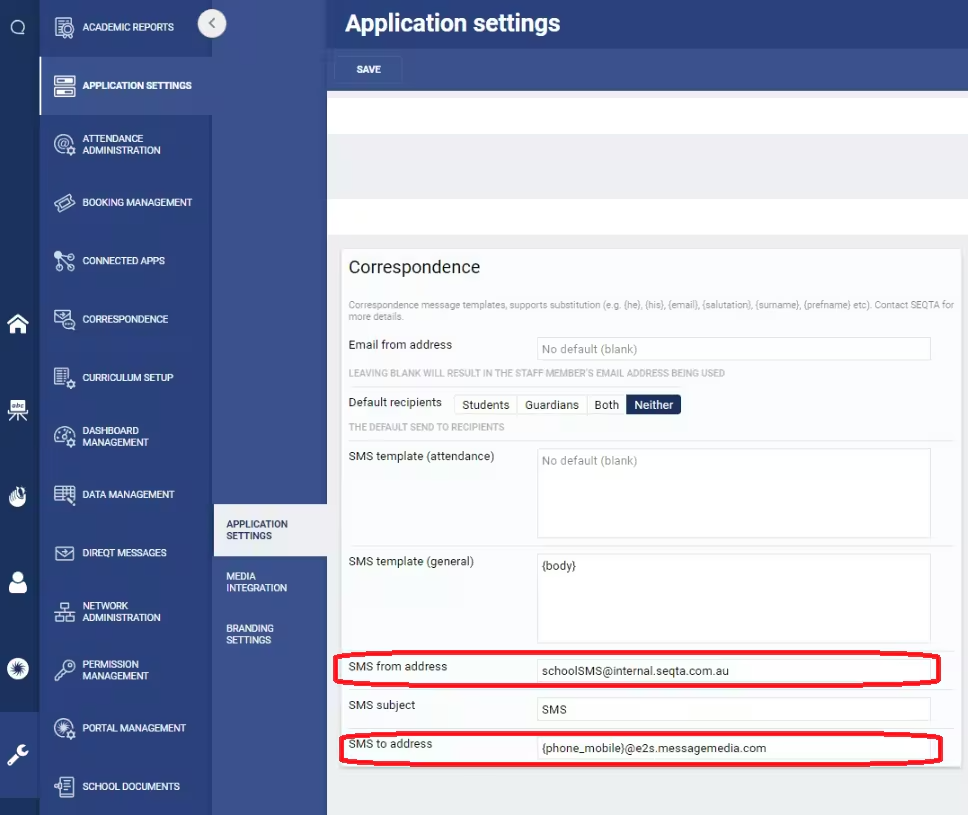
If impacted, please provide an email address to us - a suggested format could be sms@yourdomain.com
Please contact the SEQTA Support team via the Help portal for us to apply these changes or include this detail in your open case.
Once notified our systems team will:
- Update the SMS from address with the provided address
- Update the MessageMedia hub with the new SMS from address
- If the SMS to address is using a legacy MessageMedia domain (ie. e2s.pcsms.com.au & beta.pcsms.com.au) we will update these to e2s.messagemedia.com domain
All major email providers (inc O365)
In 2024, major email providers like Gmail, Yahoo, and Microsoft introduced stricter sender policies to enhance email security and privacy. These changes were driven by the need to combat spam, phishing, and other malicious activities that were becoming increasingly sophisticated.
- Key requirements included:
- Authentication: Senders must authenticate their emails using SPF, DKIM, and DMARC protocols to verify the legitimacy of the sender's domain.
- DNS Configuration: Proper alignment between forward and reverse DNS to prevent domain spoofing.
- Unsubscribe Options: Marketing emails must include a one-click unsubscribe option to give recipients control over their inbox.
- Spam Rate Management: Maintaining a spam rate below 0.1% to ensure sender reputation.
- Encryption: Emails must be encrypted to protect the content during transit.
These measures were fully enforced in 2025 to create a more secure and trustworthy email ecosystem.
Gmail - https://support.google.com/accounts/answer/185833?sjid=8514582732222329456-NC
Further information can be found here.
SendGrid
tbc
SMTP2GO
tbc
Gmail SMTP relay
Some clients have been identified who are using an insecure approach to the Gmail SMTP Relay.
This less secure approach will be deprecated in September as detailed at https://support.google.com/accounts/answer/6010255?hl=en.
Please check if you are using smtp.google.com using port 25.
Unfortunately, we are unable to assist with this.
Further details can be found at here.
Understanding SPF, DKIM, and DMARC
Email is an essential communication tool, but it can be misused for spam, phishing, and spoofing. To protect against these threats, three key email authentication protocols are used: SPF, DKIM, and DMARC.
SPF (Sender Policy Framework)
Purpose: Verifies that an email is sent from an authorized server.
How it works: A domain owner publishes an SPF record in DNS listing the servers allowed to send emails for that domain. When an email is received, the recipient’s server checks this list.
Why it matters: Helps prevent email spoofing and improves the chances that legitimate emails are delivered successfully.
DKIM (DomainKeys Identified Mail)
Purpose: Ensures the email content hasn’t been altered and confirms the sender’s identity.
How it works: The sender’s server adds a digital signature to the email header using a private key. The recipient’s server uses a public key (published in DNS) to verify the signature.
Why it matters: Protects against tampering and builds trust in the sender’s domain.
DMARC (Domain-based Message Authentication, Reporting, and Conformance)
Purpose: Provides instructions on how to handle emails that fail SPF or DKIM checks.
How it works: A domain owner sets a DMARC policy in DNS that tells receiving servers to take one of three actions—none, quarantine, or reject—when an email fails authentication. It also enables reporting.
Why it matters: Prevents spoofing, improves email deliverability, and gives domain owners visibility into how their domain is being used
Why Use All Three?
SPF checks if the email is from an approved server.
DKIM verifies the message hasn’t been changed.
DMARC enforces rules and provides feedback.
Together, they form a strong defense against email-based threats and help ensure safe, reliable communication—especially important for schools and educational institutions.
Was this article helpful?
That’s Great!
Thank you for your feedback
Sorry! We couldn't be helpful
Thank you for your feedback
Feedback sent
We appreciate your effort and will try to fix the article