TABLE OF CONTENTS
The templates for Absentee SMSes and SMSes sent through Correspondence can be edited through the Application Settings page.
The Absentee SMS and General SMS have different merge fields available. Please see the table below for details.
Editing the Absentee SMS and General SMS template
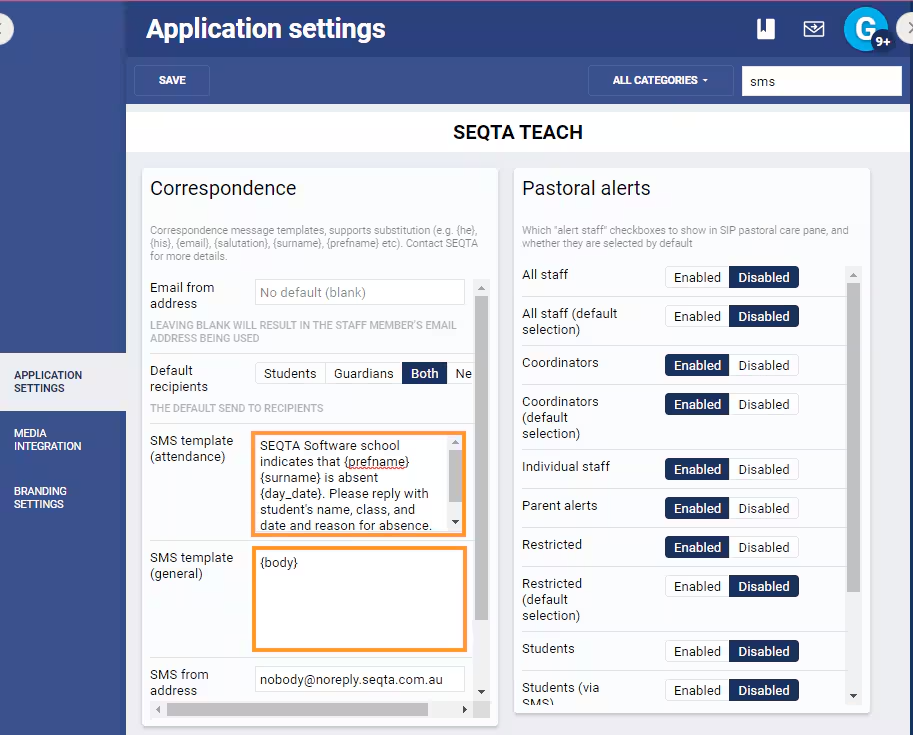
- Go to the Administration Workspace > Application Settings > Application Settings
- Search for 'sms' (without the quotes).
- The Correspondence pane will be visible (see screenshot below).
- Edit the template as required.
- NOTE: {prefname} is used to display the student name, but if there is no preferred name in the system then the student's first name will be used.
- Click Save.
SMS template (general) merge fields
The General template applies only to SMSes sent through the Correspondence page. The Correspondence page separately provides a set of merge fields for the message creation. When the SMS is sent, the merged data is included in the {body} placeholder, therefore the typical setup is to only include the {body} merge field.
| Merge field | Notes |
|---|---|
| {body} | The message text as created in the Correspondence page |
| {subject} | Subject of SMS (This is not normally needed as Correspondence has a dedicated field for the subject of the SMS). |
| {phone_mobile} | Guardian's mobile number (This is not normally needed as Correspondence has a merge field for the guardian's phone number). |
SMS template (attendance) merge fields
| Name | Notes | Data management location |
|---|---|---|
| {salutation} | Recipient salutation | Guardians>Salutation |
| {contact_title} | Contact title | Guardians>Title |
| {contact_firstname} | Contact firstname | Guardians>First name |
| {contact_surname} | Contact surname | Guardians>Surname |
| {prefname} | Student pref. name (If a preferred name is not available, uses the student's first name) | Students>Preferred name |
| {day_name} | Current day | |
| {day_date} | Current date | |
| {surname} | Student surname | Students>Surname |
| {title} | Student title | Students>Title |
| {him} | him / her / them | Students>Gender |
| {his} | his / her / their | Students>Gender |
| {his_cap} | His / Her / Them | Students>Gender |
| {he} | he / she / they | Students>Gender |
| {he_cap} | He / She / They | Students>Gender |
| {himself} | himself / herself / themself | Students>Gender |
| {son} | son / daughter / child (may not be suitable if contacts are Grandparents etc) | Students>Gender |
| {roll} | Student's rollgroup code | Rolls>Code |
| {roll_name} | Student's rollgroup name | Rolls>Name |
| {house} | Student's house code | Houses>Code |
| {year} | Student's year level code | Years>Code |
| {year_name} | Student's year level name | Years>Name |
| {campus} | Student's campus | Campuses>Name |
| {year_coord} | Year coordinator | Years>Coordinators |
| {subschool_coord} | Sub-school coordinator | Sub-schools>Coordinators |
| {roll_coord} | Roll coordinator | Rolls>Coordinators |
| {house_coord} | House coordinator | Houses>Coordinators |
| {phone} | Sub-school phone | Sub-schools>Phone number |
Related articles:
Was this article helpful?
That’s Great!
Thank you for your feedback
Sorry! We couldn't be helpful
Thank you for your feedback
Feedback sent
We appreciate your effort and will try to fix the article