How can I access my Application ID after I've registered my App?
Go to the Microsoft Application Registration Portal, if prompted log back in, the Application ID will be displayed next to the Application name you created. 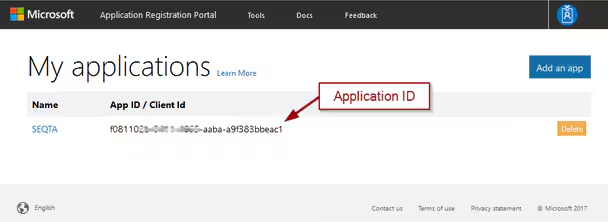
Why do I receive the error: 'Cannot find the personal tenant URL'?
This occurs if the user has not provisioned their OneDrive account. User will need to provision their OneDrive account before it can be accessed through SEQTA.
What information may be of help for the SEQTA Service Desk to troubleshoot issues?
- Screenshot or details of error. (Please screenshot entire screen.)
- Does the same thing occur if tested using a different web-browser?
Identify if OneDrive is working for any staff or if the issue is only affecting some individuals. If it's only some individuals please provide the names so we may have an example to work with. - OneDrive errors log files. These can be accessed through the console log via developer tool.
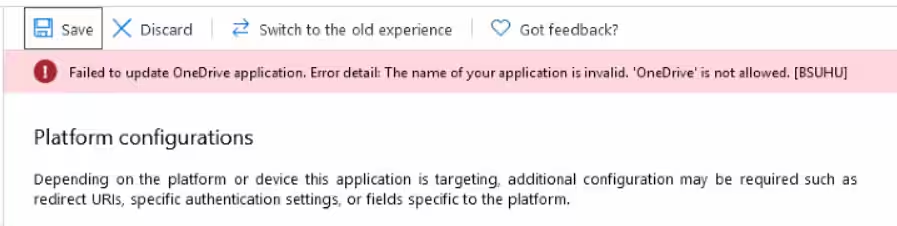
Failed to update OneDrive application. Error details: The name of your application is invalid. 'OneDrive' is not allowed'
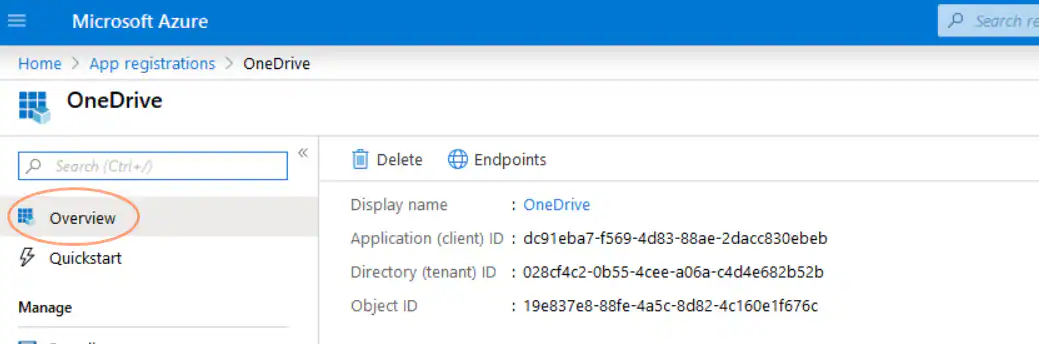
This message is displaced when there is already a registered Application is the same name. If the registered application was from a failed setup attempt it can be deleted.
Related Articles
Was this article helpful?
That’s Great!
Thank you for your feedback
Sorry! We couldn't be helpful
Thank you for your feedback
Feedback sent
We appreciate your effort and will try to fix the article