TABLE OF CONTENTS
Prerequisites
Tes has enabled the daily database backup for your installation
Tes has enabled internal auth for non-UI clients
Enable Daily Backup
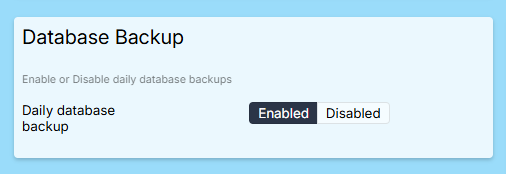
The daily backup can be enabled or disabled as follows
Login to SEQTA Teach and navigate to the application settings page: https://SCHOOL-SEQTA-DOMAIN/siteSettings/applicationSettings
Enable the daily backup using the following toggle:
Generate Encryption Keypair
A public/private keypair is used to encrypt/decrypt your backup. Tes will use your public key to encrypt the daily backup, and you will use the private key to decrypt it.
The following guidance is for generating an RSA keypair using OpenSSL
Install OpenSSL
Windows:
Using WSL:
sudo apt update
sudo apt install openssl
Verify installation with:
openssl version
Linux (Debian/Ubuntu):
Open Terminal and run:
sudo apt update
sudo apt install openssl
Verify installation with:
openssl version
Generate a 2048-bit RSA Private Key
Run:
openssl genpkey -algorithm RSA -out private_key.pem -pkeyopt rsa_keygen_bits:2048
Extract the Public Key in PEM Format
Run:
openssl rsa -pubout -in private_key.pem -out public_key.pem
Verify the Key Size
Run:
openssl rsa -pubin -in public_key.pem -text -noout
Look for a line similar to:
RSA Public-Key: (2048 bit)
Store the keypair securely
Copy the Public Key to the clipboard (needed in the next step)
Open the public_key.pem file in a text editor
Select and copy everything including:
-----BEGIN PUBLIC KEY-----
...
-----END PUBLIC KEY----
Upload Public Key
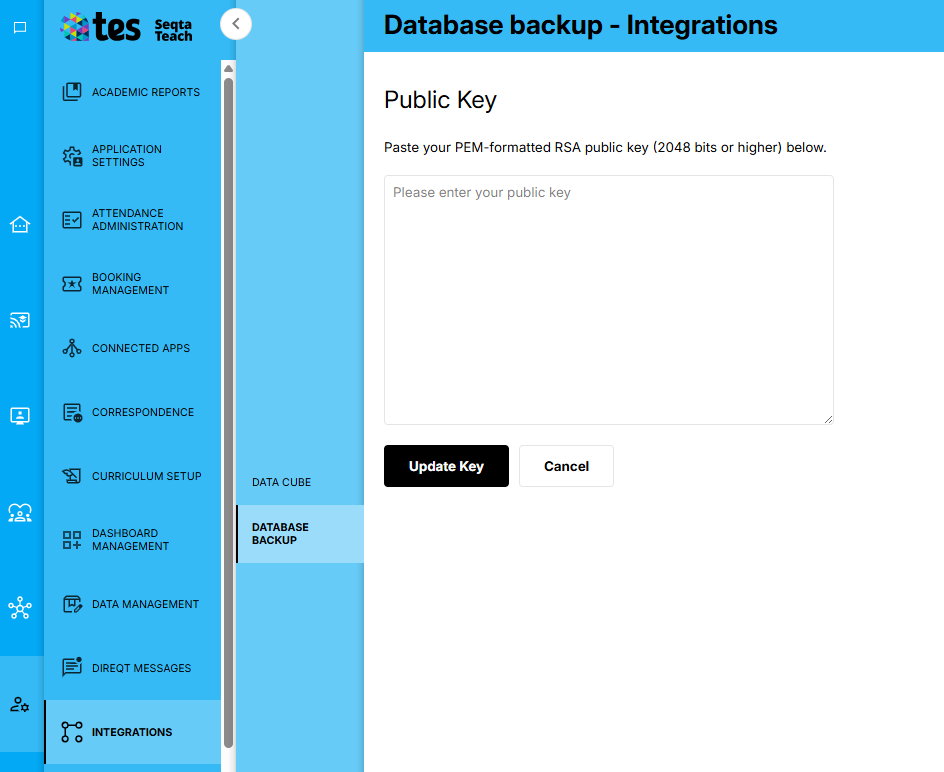
Tes uses the public key to encrypt the daily backup. Share it with Tes by uploading it into SEQTA Teach
Login to SEQTA Teach and navigate to the Administration workspace --> Integrations --> Database Backup page: https://SCHOOL-SEQTA-DOMAIN/siteSettings/integrations/databaseBackup
A staff account with the “data.edit” permission is required to view this page
Upload the public key:
Download Backup
The location of the backup is returned by a SEQTA API. An access token is needed to invoke the SEQTA API returning the backup location. Credentials are provided to the SEQTA API for obtaining an access token.
The following scripts can be combined into one, they are separated here for clearer explanation. They are designed to be executed in a bash shell.
Obtain Access Token
The following values are inputs to the following script:
SCHOOL_SEQTA_DOMAIN school-specific SEQTA hostname
USERNAME and PASSWORD corresponding to a SEQTA Teach User
CLIENT_ID:
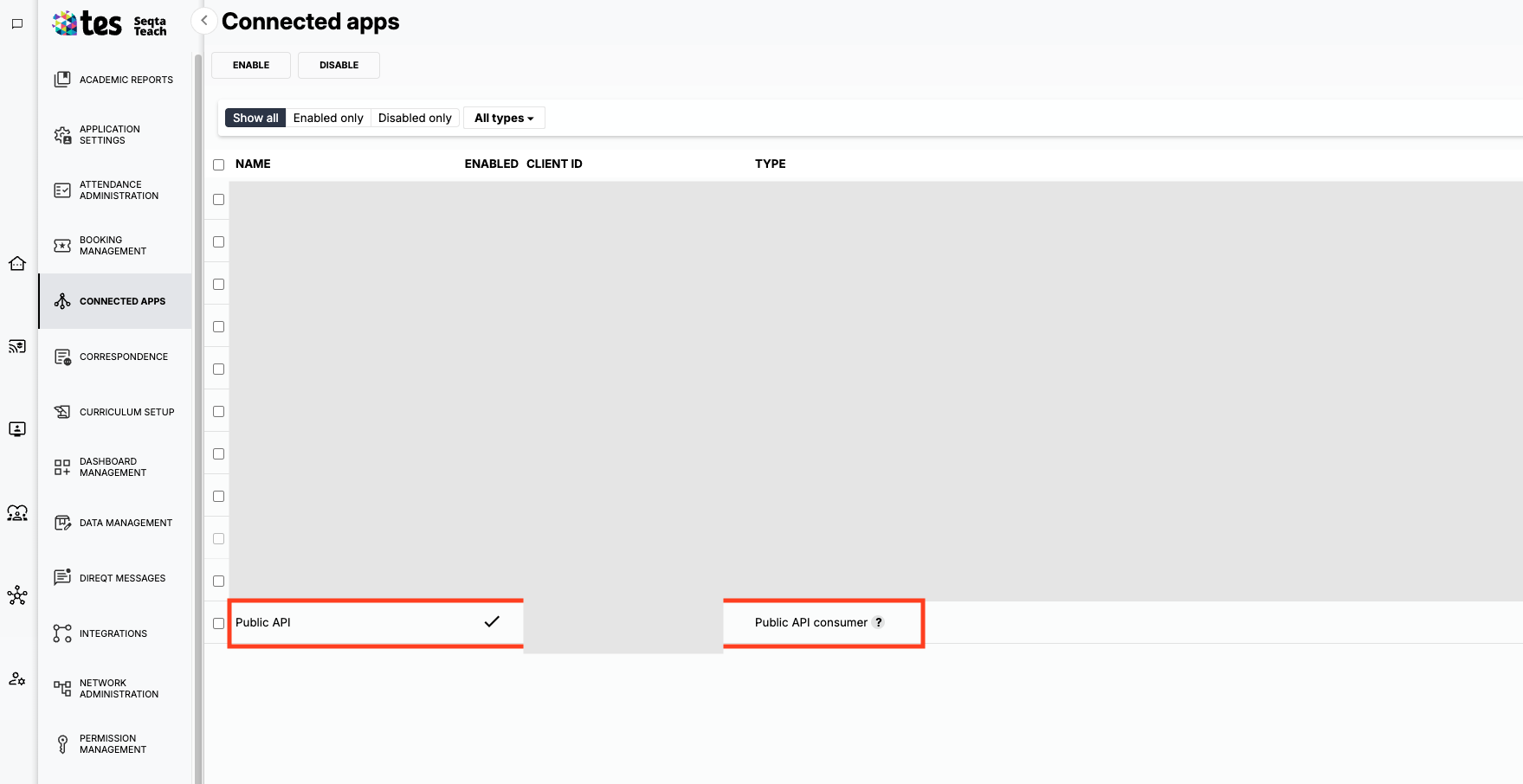
Login to SEQTA Teach and navigate to Administration Workspace → Connected Apps page: https://SCHOOL-SEQTA-DOMAIN/connectedApps
A staff account with the “applications.admin“ permission is required to view this page
The Client Id of the Public API is the value for CLIENT_ID
Run:
#!/usr/bin/env bash

SCHOOL_SEQTA_DOMAIN=MY_SCHOOL_SEQTA_DOMAIN
USERNAME=MY_USERNAME
PASSWORD=MY_PASSWORD
CLIENT_ID=MY_CLIENT_ID

JSESSION_ID=$(curl -i "https://$SCHOOL_SEQTA_DOMAIN/seqta/ta/login" \
  -H 'content-type: application/json; charset=UTF-8' \
  --data-raw "{\"username\":\"$USERNAME\",\"password\":\"$PASSWORD\",\"mode\":\"token\",\"query\":{\"client_id\":\"$CLIENT_ID\",\"response_type\":\"token\",\"scope\":\"dbDownload:read\"}}" \
  | grep -i '^Set-Cookie: JSESSIONID=' \
  | sed 's/.*JSESSIONID=\([^;]*\).*/\1/')

TOKEN_RESPONSE=$(curl -i "https://$SCHOOL_SEQTA_DOMAIN/seqta/ta/token" \
  -H 'content-type: application/json; charset=UTF-8' \
  -b "JSESSIONID=$JSESSION_ID" \
  --data-raw "{\"client_id\":\"$CLIENT_ID\",\"response_type\":\"token\",\"scope\":\"dbDownload:read\"}")

TOKEN=$(printf '%s' "$TOKEN_RESPONSE" | grep -o '"token":"[^"]*"' | sed 's/^"token":"//;s/"$//')
Obtain Backup Location
SCHOOL_SEQTA_TEACH_DOMAIN=teach.$SCHOOL_SEQTA_DOMAIN
DOWNLOAD_URL=$(curl -i -L "https://$SCHOOL_SEQTA_TEACH_DOMAIN/api/v1/databasebackup" \
  -H "Authorization: Bearer $TOKEN" | grep -o '"presignedUrl":"[^"]*"' | sed 's/^"presignedUrl":"//;s/"$//')
Obtain Backup
curl -L "$DOWNLOAD_URL" -o database-backup.tar.gzUnzip Backup
tar -xzf database-backup.tar.gzDecrypt Backup
The backup contains two files:
an encrypted AES key (“*.sql.gz_aes_key.enc”) and
AES-encrypted database dump (“*.sql.gz.enc”).
The AES key is encrypted with the school's public RSA key, the private key created earlier is used to decrypt it, then the decrypted AES key is used to decrypt the database dump.
A Python 3 script is provided to perform the decryption steps
Install Python Dependencies
Create a ‘requirements.txt’ file with the following content:
cryptography==46.0.6Create a 'setup.py' file with the following content:
from setuptools import setup, find_packages

setup(
    name="seqta-support-scripts",
    version="0.1.0",
    packages=find_packages("tasks"),
    install_requires=[
        *open("requirements.txt").read().splitlines(),
    ],
)
Install dependencies using pip:
pip3 install .Decrypt Backup using Python Script
Create ‘tasks/decrypt_database_dump.py’ file with the following content:
#!/usr/bin/env python3
# tasks/decrypt_database_dump.py
import argparse
import os
import gzip
import shutil
from cryptography.hazmat.primitives import hashes
from cryptography.hazmat.primitives import padding as sym_padding
from cryptography.hazmat.primitives import serialization
from cryptography.hazmat.primitives.asymmetric import padding
from cryptography.hazmat.primitives.ciphers import Cipher, algorithms, modes

def decrypt_aes_key(encrypted_key_path, private_key_path):
    """
    Decrypt the AES key using the tenant's RSA private key.
    """
    with open(private_key_path, "rb") as key_file:
        private_key = serialization.load_pem_private_key(
            key_file.read(),
            password=None,  # Add password if the private key is encrypted
        )

    with open(encrypted_key_path, "rb") as encrypted_key_file:
        encrypted_aes_key = encrypted_key_file.read()

    aes_key = private_key.decrypt(
        encrypted_aes_key,
        padding.OAEP(
            mgf=padding.MGF1(algorithm=hashes.SHA256()),
            algorithm=hashes.SHA256(),
            label=None,
        ),
    )
    return aes_key

def decrypt_file(encrypted_file_path, decrypted_file_path, aes_key):
    """
    Decrypt the file using the AES key and IV.
    """
    with open(encrypted_file_path, "rb") as encrypted_file:
        salt = encrypted_file.read(
            16
        )  # Read salt (not used here but part of the format)
        iv = encrypted_file.read(16)  # Read IV
        encrypted_data = encrypted_file.read()

    cipher = Cipher(algorithms.AES(aes_key), modes.CBC(iv))
    decryptor = cipher.decryptor()
    decrypted_data = decryptor.update(encrypted_data) + decryptor.finalize()

    # Validate gzip magic number
    if not decrypted_data.startswith(b"\x1f\x8b"):
        print("Warning: Decrypted data does not start with gzip magic number (1F 8B).")

    # Re-enable PKCS7 padding removal
    unpadder = sym_padding.PKCS7(algorithms.AES.block_size).unpadder()
    try:
        decrypted_data = unpadder.update(decrypted_data) + unpadder.finalize()
    except ValueError as e:
        print("Error during padding removal:", e)
        raise

    with open(decrypted_file_path, "wb") as decrypted_file:
        decrypted_file.write(decrypted_data)

def main():
    parser = argparse.ArgumentParser(description="Decrypt an encrypted file.")
    parser.add_argument("--key", required=True, help="Path to encrypted AES key file")
    parser.add_argument("--priv", required=True, help="Path to RSA private key file")
    parser.add_argument("--in", dest="enc_file", required=True, help="Path to encrypted file")
    parser.add_argument("--extract", action="store_true", help="Extract the decrypted file with gunzip")
    args = parser.parse_args()

    encrypted_key_path = args.key
    private_key_path = args.priv
    encrypted_file_path = args.enc_file

    # Automatically generate output filename by removing '.enc'
    if encrypted_file_path.endswith(".enc"):
        decrypted_file_path = encrypted_file_path[:-4]
    else:
        decrypted_file_path = encrypted_file_path + ".decrypted"

    print("Decrypting AES key...")
    aes_key = decrypt_aes_key(encrypted_key_path, private_key_path)
    print("AES key decrypted successfully.")

    print("Decrypting file...")
    decrypt_file(encrypted_file_path, decrypted_file_path, aes_key)
    print("File decrypted successfully.")

    if args.extract:
        extracted_file_path = decrypted_file_path.rstrip('.gz')
        with gzip.open(decrypted_file_path, 'rb') as f_in, open(extracted_file_path, 'wb') as f_out:
            shutil.copyfileobj(f_in, f_out)
        print("File extracted successfully.")

if __name__ == "__main__":
    main()
Execute the script as follows, updating the PRIVATE_KEYFILE and DB_BACKUP_LOCATION if needed:
PRIVATE_KEYFILE=PRIVATE_KEY.pem
DB_BACKUP_LOCATION=.
AES_KEYFILE=$(ls $DB_BACKUP_LOCATION/*.sql.gz_aes_key.enc)
DB_SQL_FILE=$(ls $DB_BACKUP_LOCATION/*.sql.gz.enc)
python3 tasks/decrypt_database_dump.py --key $AES_KEYFILE --priv $PRIVATE_KEYFILE --in $DB_SQL_FILE --extract
The “$DB_BACKUP_LOCATION/*.sql” file can then be used to restore the database.
Was this article helpful?
That’s Great!
Thank you for your feedback
Sorry! We couldn't be helpful
Thank you for your feedback
Feedback sent
We appreciate your effort and will try to fix the article