TABLE OF CONTENTS
- Creating and managing year records in SEQTA
- Assigning year level to students
- Assigning year levels to sub-schools
- Deleting school year records
'Year' (school year) records are used to categorise subject records to allow the selection of a subgroups of students when sending correspondence, viewing or printing information to staff. This information is also drawn onto various reports throughout SEQTA.
Data for year records can be synced from the schools Administration system (MAZE, Synergetic etc), or created and managed directly in SEQTA through the 'Data management' page.
Before making changes in the Data management page please check to ensure the information is not synced or the changes made may be overwritten by the overnight sync (see below for steps).
Table 1. Year information and the sync. Depending on the sync setup some school's may be able to sync sub-school. Please raise a ticket for the Sync team through the SEQTA Service desk for further information.
| Record | Can be synced? |
| Code | Yes |
| Auxiliary code | No |
| Name | Yes |
| Phone number | No |
| Coordinator | No |
| Coordinator salutation | No |
| Sub-school | No |
Creating and managing year records in SEQTA
- Go to the Administration workspace > Data management > Years
- Select Add record to create a new Year record. Alternately, select an existing record to edit
- Fill out the fields as required
- Click Save to keep the changes
Assigning year level to students
- Go to the Administration workspace > Data management > Students
- Search for the student name by typing part of the name in the search box
- Click on the student record to open up the edit window
- Set the school year as required
- Click Save
Assigning year levels to sub-schools
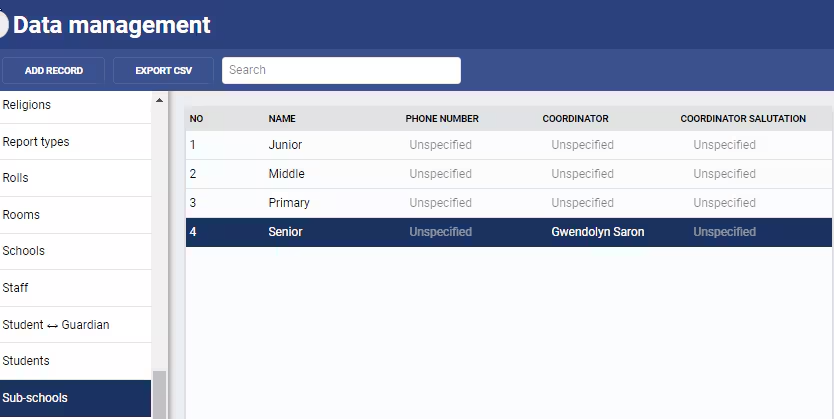
To assign a 'year' record to a sub-school first select 'sub-schools' from the left-hand menu on the Data management page. Ensure they have been created and add them if they have not.
Sub-schools | Sub-school is used to categorise years into groups. Examples: · Junior (years KG - PP) · Primary (years 1 - 6) · Middle (years 7 - 10) · Senior (years 11 12) |
Example sub-schools
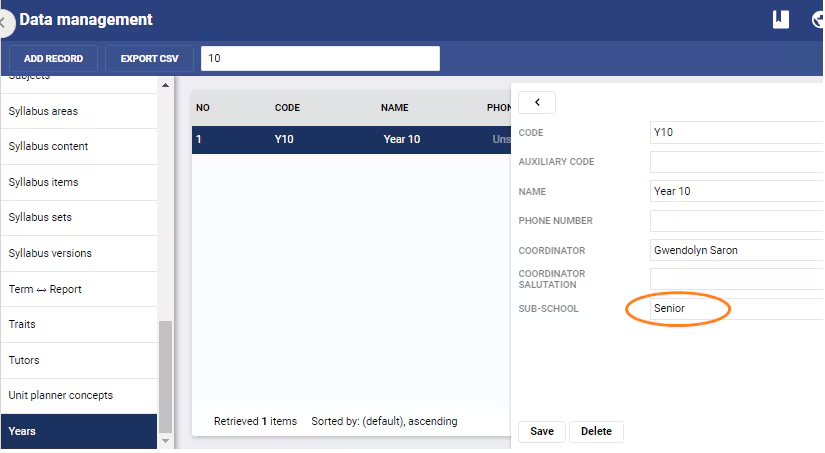
Edit the year record and select the applicable sub-school for that year.
Deleting school year records
Deleting school year records is not recommended as it affects historical student information. Should records need to be deleted please contact the SEQTA Service desk
Was this article helpful?
That’s Great!
Thank you for your feedback
Sorry! We couldn't be helpful
Thank you for your feedback
Feedback sent
We appreciate your effort and will try to fix the article