TABLE OF CONTENTS
Viewing and printing time-based attendance
The Time-based view displays all attendance entered for a student on a minute-by-minute basis for a 24 hour period. The Time-based view is also used for viewing attendance recorded using Calendar classes.
The attendance displayed is determined by the priority and order the attendance is entered. This is very helpful for identifying any issues or discrepancy with a student's attendance.
There are two methods for viewing attendance in Time-based view. These are:
A. Viewing time-based attendance in the SIP
- Select the student in the Student Information Panel
- Select the View attendance history icon (@) found at the right of the SIP
- Click on the Time-based button
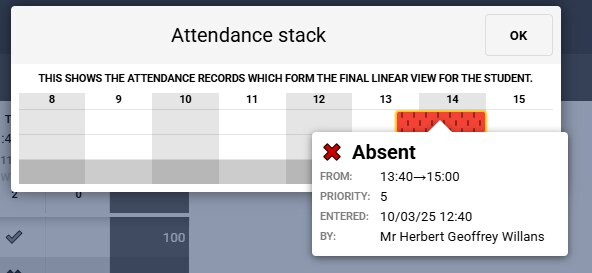
- Click on the Date to view the Attendance Stack pop-up. To view details of when the attendance was entered etc, hover the cursor over the coloured bar.
- To close the Attendance stack pop-up, click OK
B. Time-based attendance reports
- Attendance reports that include (linear view) in the report name will display time-based attendance. Click here for steps for printing attendance reports.
- Attendance statistics reports will pick up Time-based attendance when calculating the attendance statistics.
Was this article helpful?
That’s Great!
Thank you for your feedback
Sorry! We couldn't be helpful
Thank you for your feedback
Feedback sent
We appreciate your effort and will try to fix the article