The Attendance Stack shows the history of attendance entered for a specific student on any given day. The attendance stack is a reliable way to investigate attendance issues such as identifying who has over-written or removed attendance.
Attendance solutions that have been removed using the 'Undo Solutions' page will not be visible in the Attendance stack. Rather, they only appear in the 'Undo Solutions' page.
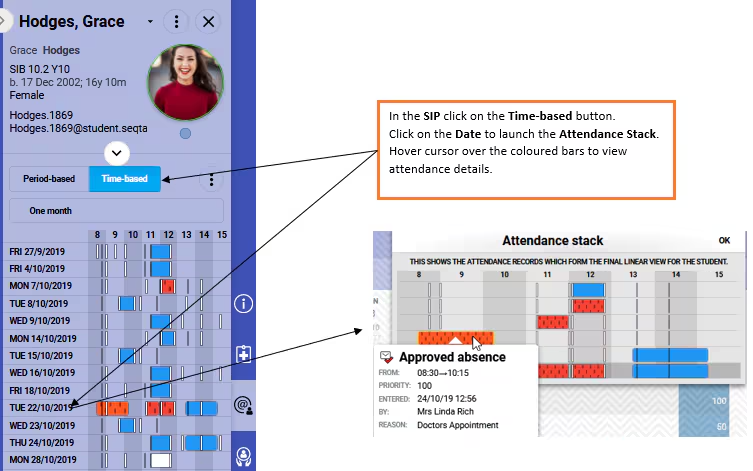
The following information is available when viewing the attendance stack:
- Name of the person that entered the attendance
- When the attendance was entered
- The type of attendance
- The priority of the attendance
- The times the attendance was entered for
Steps For Viewing the Attendance Stack
- Select a student in the SIP.
- Select the Attendance pane "@" icon found at the right of the SIP.
- Click on the Time-based button.
- Click on the Date, to view the Attendance stack pop-up. To view details of when the attendance was entered etc, hover the cursor over the coloured bar.
- To close the Attendance stack pop-up, click OK.
Was this article helpful?
That’s Great!
Thank you for your feedback
Sorry! We couldn't be helpful
Thank you for your feedback
Feedback sent
We appreciate your effort and will try to fix the article