TABLE OF CONTENTS
- Emergency Evacuations
- Evacuation Process
- Printing the Emergency: Master absence list
- Master Enrolment (Attendance) List
- The Master Enrolment list is best printed from the 'Source of Truth' at your school. This will typically be the school's admin system (Synergetic etc.). Schools without an external admin system can print class/roll lists directly through SEQTA using the steps in the following articles:
Emergency Evacuations
Schools should have established processes for handling emergency evacuations. SEQTA recommends discussing your school’s Emergency Procedures with your SEQTA Customer Success Manager to discuss specifically how your school’s Emergency Procedures can be managed using SEQTA Teach. For assistance, please contact the SEQTA Support team via the Help portal, or email seqta.support@tes.com.
The Emergency report is used as the master absence list in an emergency evacuation. This report can be customised to include grouping on request. See: Printing and Customising the Emergency Report (Master-Absence List)
Evacuation Process
Most school evacuation procedures include the following elements, but there may be variations depending on your school's policies and procedures:
- Students are organised into predetermined groups at the evacuation muster point.
- Designated teachers check the attendance for these groups using the attendance list (typically a paper copy).
- Some schools maintain a current enrolment list in the evacuation pack at all times. Attendance at the muster point is checked against the enrolment list.
- Admin staff print the Emergency: Master absence list report.
- The attendance lists are sent to a command post and cross-referenced by designated staff against the Emergency: Master absence list report. A discrepancy between the lists will need a response, as shown in the table below.
- A search is undertaken for any student who is not marked absent on the master absentee list, and is absent from their designated group.
| Emergency: Master absence list | Muster point attendance list | Action required |
|---|---|---|
Not listed as absent | Present | None |
Not listed as absent | Absent | Student is missing, start search process |
Absent | Present | Review attendance process |
Absent | Absent | None |
Printing the Emergency: Master absence list
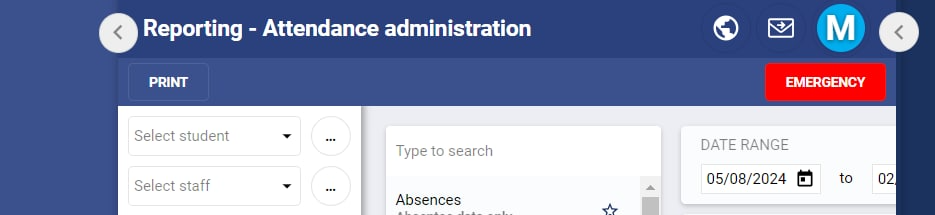
- Go to Administration workspace>Attendance administration (any sub page)
- Click the red Emergency button in the top-right corner.
- When the document is ready, a dialogue will appear. Select Click here to access your document.
- Print the report.
Master Enrolment (Attendance) List
The Master Enrolment List should be printed in advance and kept in your school's Emergency Evacuation Pack. The list should be reprinted whenever changes are made. For example, if the master enrolment list is by roll group, it will need to be reprinted whenever a student changes roll group, leaves the school or is newly enrolled at the school.
The Master Enrolment list is best printed from the 'Source of Truth' at your school. This will typically be the school's admin system (Synergetic etc.). Schools without an external admin system can print class/roll lists directly through SEQTA using the steps in the following articles:
Was this article helpful?
That’s Great!
Thank you for your feedback
Sorry! We couldn't be helpful
Thank you for your feedback
Feedback sent
We appreciate your effort and will try to fix the article