TABLE OF CONTENTS
Individual class instances can be assigned to a different teacher using the 'Swap' option. Should a relief teacher be filling in for more then a few weeks, a better option may be to assign them as a teacher in the timetable system, rather then reassigning the classes one at a time.
Relief teachers as assigned a score to assist with finding a suitable Relief teacher. These are based on availability and other factors, click here to learn How the relief teacher scores are calculated for more detailed information.
It is not possible to assign a relief to more than one class instance at time.
Permission Required to Assign Reliefs
The permission 'RELF' is required for the 'Staff' tab to show under the 'Swap' option.
Assigning a Relief Teacher
- Click the Teaching Workspace > Timetable > My Day (if for the current day), otherwise 'Traditional' or 'Calendar'.
- Select the name of the current class teacher in the top right to open their timetable
- Select the date for the class.
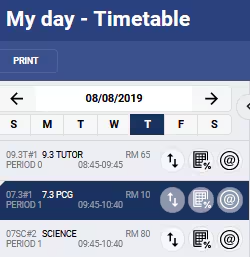
- Click on the 'Swap' icon
 and select the teacher you would like to assign as a relief.
 - Click 'Save'.
Was this article helpful?
That’s Great!
Thank you for your feedback
Sorry! We couldn't be helpful
Thank you for your feedback
Feedback sent
We appreciate your effort and will try to fix the article