'Contact rules' refer to the logic that is applied during the synchronisation process that determine:
- Which contacts are synced into SEQTA
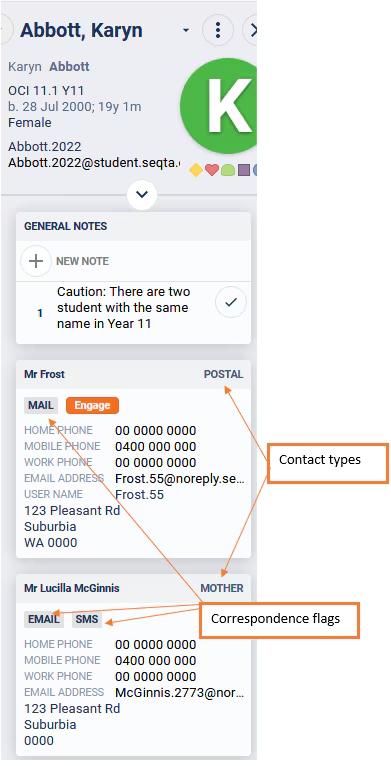
- Which contacts are flagged to receive correspondence regarding the student
- The type of correspondence a contact is flagged to receive, these include email, SEQTA Engage access, SMS and postal
The contact rules are setup during the implementation process based on the rules specified by the school on the implementation form. Changes to the rules can be made on request at any point with email authorisation from the School Education Contact or the School Technical Contact.
School's are responsible for identifying which contacts are legally entitled to receive correspondence relating to their child. Please check the contact flags after implementation and after changes have been made to the rules.
Image displaying contact types and correspondence flags
Checking contact rules and correspondence flags
It's essential the school's SEQTA administrators check the contact rules and correspondence flags to ensure they meet with the school's policy regarding the sharing of student information.
To check the rules:
- Select the student name in the SIP
- The contacts will be listed under 'Contact information'
- Be sure to check the following:
- The required contact types are being displayed (eg. 'Mother', 'Father', 'Residential')
- The Correspondence flags are against the correct contacts. For example, the 'SMS' flag should not be displayed against a contact type that has no mobile number associated
- The appropriate contacts for 'split families' are showing and flagged correctly for correspondence
- If there is more then one contact type with the same email address, or mobile number, only one is flagged for the same type of correspondence (eg. email or SMS)
Was this article helpful?
That’s Great!
Thank you for your feedback
Sorry! We couldn't be helpful
Thank you for your feedback
Feedback sent
We appreciate your effort and will try to fix the article