TABLE OF CONTENTS
- Introduction
- How does this impact users
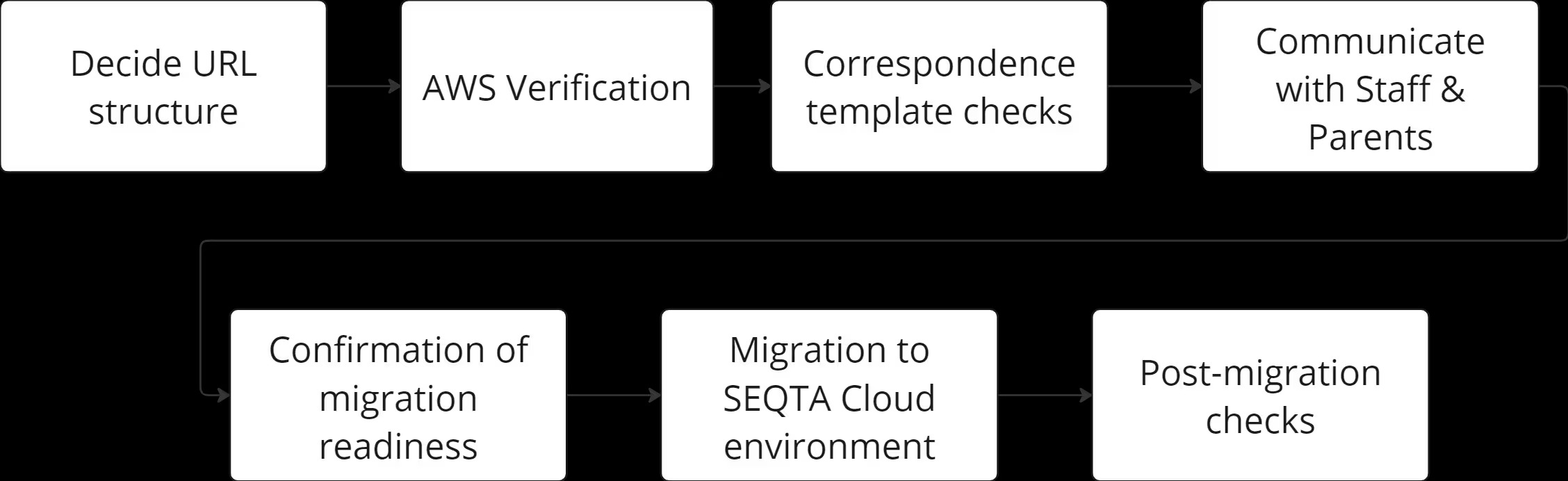
- As a school, what do I need to do?
- 1. Decide your school’s approach to the URL change
- 2. AWS email verification
- 3. Correspondence templates
- 4. Let users know about the upcoming change
- 5. Confirmation of migration readiness
- 6. What needs to happen during the migration? (Migration Day)
- 7. What needs to happen after the migration? (Migration + 1 Day)
- Resources to help with the change
Introduction
| The following knowledgebase article outlines in more detail the information communicated to you in a direct mail about your current Hosted environment. If your school did not receive a communication about this required change nor a call from your CSM, this information is not relevant to your school’s particular situation |
SEQTA is changing its hosting infrastructure. We are committed to maintaining SEQTA’s market-leading position within the software ecosystem of schools as the leading visible learning and wellbeing platform. These infrastructure improvements will ensure the long-term performance and reliability of SEQTA in collaboration with our strategic partners AWS.
The new infrastructure is designed to improve reliability, security and maintenance of the system. This means we will be able to deliver a long-lasting, reliable software solution to our customers and bring more frequent value-add updates and improvements over time.
As part of this improvement work we have been trying to find a way to cause the least amount of disruption to schools as feasibly possible. All of our proposed approaches have advantages and disadvantages, but as we refuse to compromise on quality, we must inevitably introduce some disruptive changes to schools.
SEQTA Cloud schools will need to update their connecting domain(s), and potentially delegate a subdomain to us.
Domain changes - updating URL
With our changes in hosting solution, we need to change the domains that all your users (staff, parents, and students) use to access SEQTA. To provide a robust and resilient service, we need to manage the DNS records that point to SEQTA's services. There are two options available to schools:
Change to a new domain. To cater for global customers, for alignment across EH products, and to ease transition from one infrastructure to another, we are standardising domains, to move to <school ID>.onseqtacloud.com domain.
Sub-domain | URL | Example |
|---|---|---|
| Teach | https://teach.{schooldomain}/ | teach.<school ID>.onseqtacloud.com |
| Mobile | https://mobile.{schooldomain}/ | mobile.<school ID>.onseqtacloud.com |
| Learn | https://learn.{schooldomain}/ | learn.<school ID>.onseqtacloud.com |
| Engage | https://engage.{schooldomain}/ | engage.<school ID>.onseqtacloud.com |
| Tutor | https://tutor.{schooldomain}/ | tutor.<school ID>.onseqtacloud.com |
| Resource | https://resource.{schooldomain}/ | resource.<school ID>.onseqtacloud.com |
OR
Delegate a subdomain of your existing domain to us. This means we need to add a subdomain to your domains. For example, if you previously accessed the ‘teach’ application at teach.myschool.edu.au, you will now access it at teach.seqta.myschool.edu.au. Schools are able to choose the domains used, but we would suggest the following pattern:
Current URL: teach.pretendschool.qld.edu.au
New URL: teach.seqta.pretendschool.qld.edu.au
Or: teach.(whatever you choose).pretendschool.qld.edu.au
Current URL: teach.myschool.com
New URL: teach.seqta.myschool.com
Or: teach.(whatever you choose).myschool.com
Subdomain delegation
The process of subdomain delegation authorises Education Horizons to manage the SEQTA subdomain. This will enable Education Horizons to continue to manage your SEQTA experience and reduce operational complexity when using your custom domain in the future, such as certificate management. This will grant SEQTA the ability to leverage the full benefits of a cloud hosted solution by automatically handling network and load issues, providing virtually zero downtime send and receive data, messages and updates and continue to operate and maintain SEQTA as it currently does.
Configuring this will require a subdomain of your site to be delegated to us in your DNS. Your school domain namewebsite, email services, and all other parts of your infrastructure will not need to change for this process., but only a subdomain of your choosing will need to be nominated for delegation (we recommend the inclusion of “seqta”).
How does this impact users
As the connecting URL is changing, all users will need to relog in to the new URL after the migration date.
Staff
The change to the URL means that staff, including teachers, tutors, attendance administrators, office staff, and school leaders, will need to use a new URL when connecting to SEQTA. This means:
Existing sessions will need end. Best practice would be logging off each night, but there will be some instances still open
A new URL will need to be supplied to all staff, who will need to use this domain to login after the change
Staff will need to update any saved bookmarks they use to access areas of SEQTA
The above changes will need to be communicated to users of SEQTA Teach, SEQTA Tutor, SEQTA Kiosk, SEQTA Notices, SEQTA Mobile (TAMA)
Parents and Students
The change to the URL means that Parents and Students accessing SEQTA Engage and SEQTA Learn respectively, will need to end any exiting sessions and login again to the new domain. The user accounts for their Apps will need to be setup again (a new Welcome Email sent) with the updated URL. This change must happen after the cutover to the new URL, but is recommended it is communicated before hand.
| Once this setup has happened, access and functionality will remain as it was before |
As a school, what do I need to do?
1. Decide your school’s approach to the URL change
Are you planning to change your URL or delegate a subdomain to SEQTA?
Determine your school’s desired domain for accessing SEQTA. See the recommendation above for pattern suggestions
1a. Let SEQTA know
Let us know your chosen approach so that we can create the required DNS records that will need to be updated with your service provider
1b. DNS updates :
We are changing the way SEQTA sends emails. Emails sent from your school’s SEQTA application will now be sent via the AWS Simple Email Service. To ensure your emails are less likely to be flagged for SPAM or delayed in reaching your school’s community, we must submit all sending domains for verification.
We recommend you also review your SPF record to ensure
include:_spf.seqta.com.auis present.If you have an existing SPF TXT record on your email sending domain, simply update the existing record with the following:
include:_spf.seqta.com.au(e.g.v=spf1 a include:example.com include:_spf.seqta.com.au -all)If you do not have an existing SPF entry, add a new TXT record as follows:
v=spf1 a include:_spf.seqta.com.au -all
1c. Delegating a subdomain:
If you intend to retain your current school’s domain, a subdomain of your site will need to be delegated to us in your DNS. In order to delegate a subdomain, you will need to add all provided Nameserver(NS) records to your school's DNS. There are many different DNS providers, and each provider has their own documentation for how to implement this. We have provided the links to common DNS providers below. Should you need help or require specific documentation for a provider, we can help.
For more information, refer to the following sites or similar resources:
DNS Made Easy: for delegating a Subdomain to a 3rd party DNS Provider
GoDaddy: info on how to add an NS record
1d. VPN setup:
For schools with on-prem integrations, additional VPN setup may be required. This is not required for schools with hosting integrations (VPN Peering). If your school has on-prem integrations, we will arrange a discussion with your team about this particular step.
2. AWS email verification
2a. Verification
Once the DNS changes have been made, we will need to verify the changes with AWS. This can take between 3 and 8 days and we will let you know as soon as we have that confirmation.
2b. Pre-migration
Once verified, we can move to the next pre-migration stage that involves the creation of your new Cloud environment in accordance with your school’s specific needs
2c. Migration date confirmation
We will discuss with your team the best timeline for your migration and confirm this date and time with you.
3. Correspondence templates
While we are waiting on AWS verification we will do a review of your school’s correspondence templates to determine if any may be affected by this change in URL. Our testing shows that if URLs have been included as an additional field, they will be changed automatically following the change, but it is worth reviewing these documents to ensure this is the case for your school. This may not be true if these templates have been changed manually in the past.
If any changes are needed due to this URL change, simply let us know the templates affected and we will make the changes necessary, at no additional cost. Non-URL affected changes are costed as usual.
We will also begin building the replacement Welcome email your Parents and Students will need for logging into SEQTA Engage and SEQTA Learn after the migration
4. Let users know about the upcoming change
4a. Internal communications:
Schools will need to send a new login URL to all their staff following the cutover. We suggest informing staff of the upcoming change and supply details of where they might find help if they encounter any issues. An internal email from your IT Team describing what is happening and when, would be best to maintain school IT authority, etc. The following could be used as a template
Dear staff
As part of an improvement exercise by SEQTA, the URL used to access SEQTA will be changing on [insert date]
On this date, we will email you a new URL link that can be used to login to SEQTA. The old URL will no longer work, but all permissions, functionality and data within SEQTA will be unchanged. This only affects how you access SEQTA, not how you use it.
We recommend you update your bookmarks with the new URL when you have successfully logged in again
Please take this opportunity to review your password strength in accordance with our [School IT Security Policy]
[Forgotten password process]
[Reset Password process]
This change applies to SEQTA Teach, SEQTA Tutor, SEQTA Kiosk, SEQTA Notices, SEQTA Mobile (TAMA)
Thank you
[School IT Team]
4b. External communications:
We recommend informing your Parent and Student communities before the change so that they are prepared.
Dear parent Improvements to the infrastructure of one of our key software tools, SEQTA, is underway. As part of this upgrade, all users of SEQTA Engage and SEQTA Learn web portal and Apps will be required to use a new URL. This new URL will be supplied on [insert cutover date] On this date, we will send you a new Welcome email that can be used to login to SEQTA. The old URL will no longer work, but all permissions, functionality and data within SEQTA will be unchanged. This only affects how you access SEQTA, not how you use it.
This change applies to SEQTA Engage and SEQTA Learn
Thank you [School IT Team] |
5. Confirmation of migration readiness
5a. 3 days prior: We will confirm with you that everything is in place, has been communicated and that all final pieces have been resolved and there are no outstanding tasks.
5b 1 day prior: We will confirm that everything is ready to go
6. What needs to happen during the migration? (Migration Day)
SEQTA will manage the change out of school hours on the date agreed with no need for school IT staff to be a part of the cutover process.
7. What needs to happen after the migration? (Migration + 1 Day)
7a. Internal communications:
Schools will need to send the new login URL to all their staff following the cutover. The following could be used as a template
Dear staff As part of an improvement exercise by SEQTA, the URL used to access SEQTA has changed. the new URLs are: SEQTA Teach: [insert new Teach URL] SEQTA Tutor: [insert new Tutor URL] SEQTA Kiosk: [insert new Kiosk URL] SEQTA Notices: [insert new Notices URL] SEQTA Mobile (TAMA): [insert new TAMA URL]
The old URL will no longer work, but all permissions, functionality and data within SEQTA are unchanged. This only affects how you access SEQTA, not how you use it.
We recommend you update your bookmarks with the new URL(s) when you have successfully logged in again Please take this opportunity to review your password strength in accordance with our [School IT Security Policy] [Forgotten password process] [Reset Password process]
Thank you [School IT Team] |
7b. External communications:
Schools will need to send the new Welcome email to all Parents and Students. Use the new template provided by SEQTA as this will contain the new URL
Resources to help with the change
Knowledge Base articles
If you need any further assistance with any of these steps, please reach out to your CSM who can help you through this process
Was this article helpful?
That’s Great!
Thank you for your feedback
Sorry! We couldn't be helpful
Thank you for your feedback
Feedback sent
We appreciate your effort and will try to fix the article