SEQTA allows the embedding of websites in Portal pages providing they are delivered. See: Identifying issues with embedding websites
The option to embed websites is only available in Portal pages using the 'Classic Editor'. The permission 'PORTALS' is required to access the Portal management page
- Click the Administration Workspace > Portal Management.
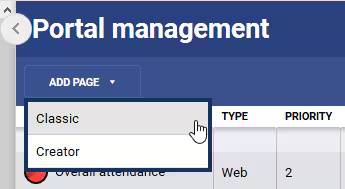
- To create a new splash page select the Add page > Classic from the top-left corner. Alternately, click on the Edit icon to make changes to an existing page.
- Enter the URL. Embedding only works if all elements for the site are delivered over a secure connection (i.e. https://).
- Click SAVE to keep changes.
Errors or Broken Images When Viewing Portal Page
Was this article helpful?
That’s Great!
Thank you for your feedback
Sorry! We couldn't be helpful
Thank you for your feedback
Feedback sent
We appreciate your effort and will try to fix the article