TABLE OF CONTENTS
There are two options with regards to how the overall grade (Mod Grade) is calculated. Schools can select either depending on which method they prefer to use.
- Grades-based course types: The grades-based calculation will take the lower bound of the cut-off for each grade result to determine the average. It will then convert that average to a grade using the cut-offs in use, and bump the grade up one level.
- Grades-based (mid-point) and Mixed mode: The grades-based calculation will take the mid-point of each cut-off to determine the average. It will then display the final grade that it falls within.
Example Using the Different Calculator Types
Where the grade cut-offs for the course types are as follows:
- A = 80
- B = 60
- C = 40
- D = 20
- E = 0
The calculations used are as follows:
| Grades | Course type calculator | Calculation | Final Grade |
| C, C, B | Grades-based | (40 + 40 + 60) / 3 = 46.67 | B |
| C, C, B | Grades-based (mid-point) | (50 + 50 + 70) / 3 = 56.67 | C |
| C, C, B | Mixed-mode | (50 + 50 + 70) / 3 = 56.67 | C |
Changing the Course Type Calculator for a Course Type
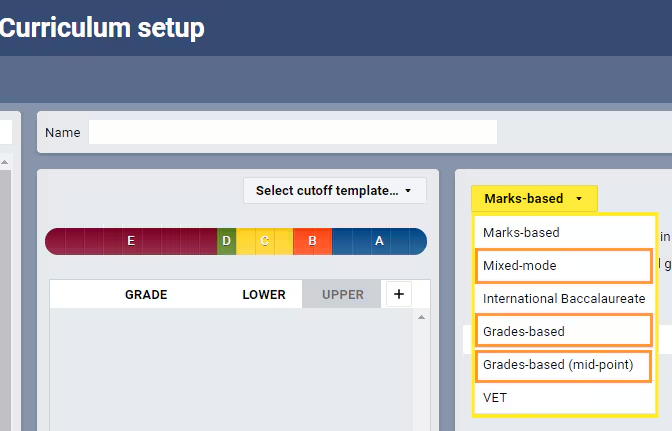
Please use caution when changing the calculator for a course type as it will affect all programmes using that course type. If in doubt please contact the school's SEQTA CSM (Customer Success Manager) through the SEQTA Support team for advice, or email the Customer Success team.
- Go to the Administration Workspace > Curriculum Setup > Course Types.
- Select the Course type.
- Select the applicable calculator option from the drop-down.
- Click Save.
Was this article helpful?
That’s Great!
Thank you for your feedback
Sorry! We couldn't be helpful
Thank you for your feedback
Feedback sent
We appreciate your effort and will try to fix the article