It is not possible to print Rubrics unless through an assessment. There is no central Rubrics library management page from where Rubrics can be printed. Printing can only be done at a programme level.
- Go to the Teaching Workspace > Timetable > My Day/My Classes/Traditional/Calendar.
- Click on the Load Programme icon for the class.
- Select Overview of Assessments.
- Go to the Teaching Workspace > Timetable > My Day/My Classes/Traditional/Calendar.
- Click on the Load Programme icon for the class.
- Select Overview of Assessments from the sub-page menu.
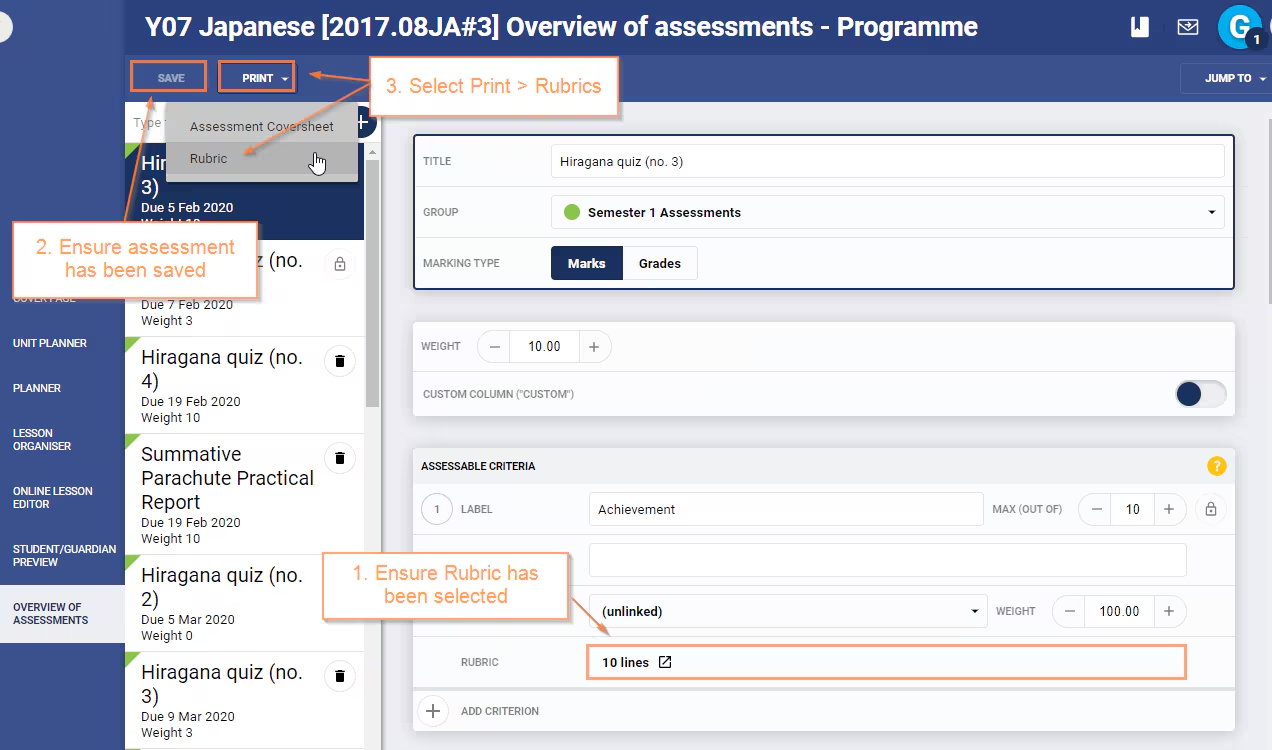
- Select the Assessment with the Rubrics you would like to print.
- Ensure the Save option has been selected.
- Select Print>Rubrics. Select Click Here to Access your Document.
Was this article helpful?
That’s Great!
Thank you for your feedback
Sorry! We couldn't be helpful
Thank you for your feedback
Feedback sent
We appreciate your effort and will try to fix the article