There are two settings available. One to display a message on the 'Upcoming Assessments' page, the other on the 'Past Assessments' page. These can be set independently for SEQTA Learn and SEQTA Engage.
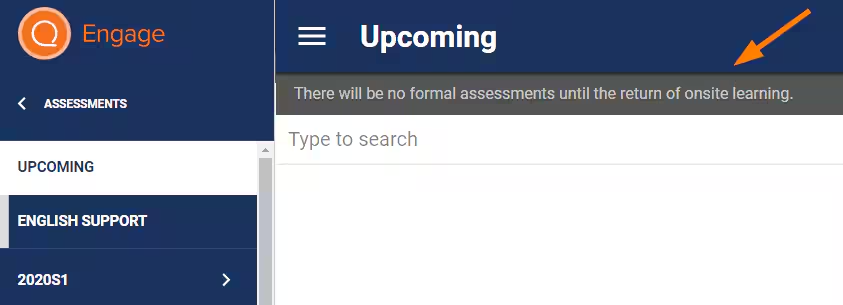
The steps are as follows:
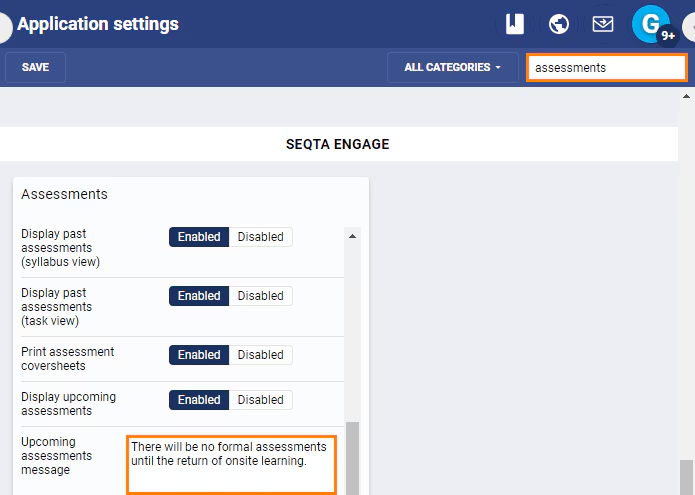
- Go to the Administration Workspace > Application Settings > Application Settings.
- Enter the word 'Assessment' in the search box.
- Scroll down till you see the sub-heading 'Assessments'. There will be one under the Category SEQTA Learn and another under SEQTA Engage as they are set independent of each other.
- Enter a message under 'Upcoming Assessments Message' and/or 'Past Assessments Message'.
Click Save.
Was this article helpful?
That’s Great!
Thank you for your feedback
Sorry! We couldn't be helpful
Thank you for your feedback
Feedback sent
We appreciate your effort and will try to fix the article