TABLE OF CONTENTS
- Errors or missing data when printing RSCOS or RSVET reports
- WARNING: No grade entered for Written and Practical for subject where there should be
- WARNING: Programme is concurrent, but has x subject(s). Expected 1.
- WARNING: Programme is concurrent, but has 3 grade(s). Expected 2.
- Report does not complete
- Error uploading file or incorrect record type message when uploading to SIRS
These reports are specific to Western Australian reporting requirements.
Warning messages do not necessarily indicate there is an error somewhere. It may mean that the system requires input from a staff member, or manual changes need to be made.
Many of these errors only occur where the school is using semester-based timetable periods and programmes have been bridged incorrectly. The use of year-long timetable periods has significantly reduced the number of bridging errors.
References to sequential and concurrent courses are largely redundant as these course types no longer exist in SEQTA Teach.
The following warnings are covered in this article:
Errors or missing data when printing RSCOS or RSVET reports
If the required information is not in the system, this may result in an error when printing the report, (eg: a blank report with headings only or blank columns). Where this is the case, work through this article ensuring everything is set up as it should be and the required codes etc. are in the system. If this does not provide a resolution or assistance is required, please contact the SEQTA Support team via the Help portal.
WARNING: No grade entered for Written and Practical for subject where there should be
- Click the Teaching workspace > Timetable > My classes > Load programme > Cover page
- Click on Marks book settings
- Ensure the correct Course type is selected. ie: Course of study (practical)
- Click Save.
- Click on the Marks book page.
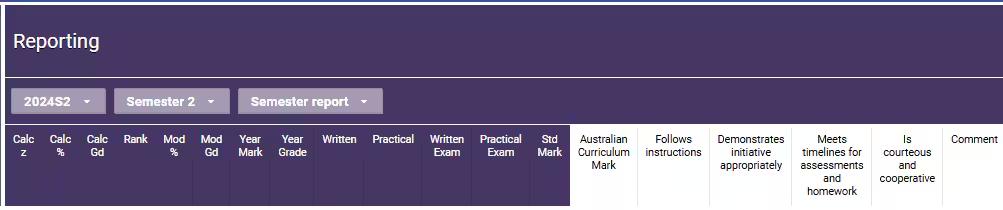
- Scroll across to the right to the purple reporting section. Select the correct Timetable period, Report type and Report template (eg: 2024S2 - Semester 2 - Semester report).
- Check the Written and Practical scores have been entered into the columns.
WARNING: Programme is concurrent, but has x subject(s). Expected 1.
The following warnings fall into the same category:
- WARNING: Programme is concurrent, but has 2 subject(s). Expected 1.
- WARNING: Programme is concurrent, but has 3 subject(s). Expected 1.
- WARNING: Programme is concurrent, but has 4 subject(s). Expected 1.
This warning indicates the student was enrolled in more than one class for the selected timetable period.
WARNING: Programme is concurrent, but has 3 grade(s). Expected 2.
This warning occurs as a result of data being entered under the incorrect Timetable period/Report type combination. In the example below, the second entry would need to be deleted. This can be done through the Marks book or through the Report editor page.
| Entry | Timetable Period | Report Type | Grade | |
|---|---|---|---|---|
| 1 | 2021S1 | Semester 1 | A | Correct |
| 2 | 2021S1 | Semester 1 | B | Incorrect! |
| 3 | 2021S2 | Semester 2 | B | Correct |
Report does not complete
If the report does not complete (nothing appears under Notifications), this generally indicates there are grades (instead of numerical values) in the Written and/or Practical field for one or more students.
There are two resolutions:
- Delete the grades from the Marks Book
- If the course is not reported on for RSCOS, then change the course type to something other than a Course of Study course type (eg: Marks-Based).
If the above information does not provide a resolution please contact the SEQTA Support team via the Help portal. Please include as much information as possible.
Error uploading file or incorrect record type message when uploading to SIRS
This typically occurs if the naming convention for the file is not in the correct format (ie: the file being uploaded has the incorrect filename). Please consult the latest SCSA Data Procedures Manual for information about SIRS upload processes.
Related pages:
Was this article helpful?
That’s Great!
Thank you for your feedback
Sorry! We couldn't be helpful
Thank you for your feedback
Feedback sent
We appreciate your effort and will try to fix the article