TABLE OF CONTENTS
There are various options available for managing rounding in SEQTA which are outlined below.
Summary
Standard rounding is used in SEQTA, ie: less than .5 is rounded down, .5 and above is rounded up. Display rounding, Transfer rounding and Ranking rounding can be configured through the Application settings page. Rounding can also be performed as part of an academic report, but will need to be hard coded. Please contact the SEQTA Support team via the Help portal. They will put you in touch with the Professional Services team to discuss your needs.
Please see below for more info about rounding: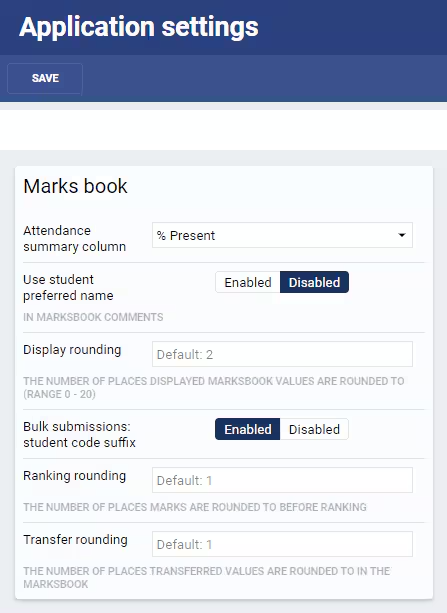
To configure rounding values:
- Please go to Administration workspace > Application settings and search for 'rounding'.
- In the Marks book settings pane, entered the required setting into the relevant field.
- Click Save.
Display rounding
Display rounding determines how many decimal places display in the marks book. If this is set to '0', no decimal places will display, however, the full values are still stored in the database and will be used in calculations. Should the setting be changed from '0' to a numerical value (eg. 2), the full values will display as the teacher entered them.
If teachers enter results with decimal places it is advisable to set 'display rounding' to 2 so the full values display in the marks book.
If there are decimal places in both weightings and criteria, the system will store the raw values in the database. The calculations occur on those raw values, then the rounding is applied, to display the result with the specified number of decimal places in the Marks book.
The Marks book display can be configured from 0 to 20 decimal places. However anything greater than about 3 places can cause display issues with the page, especially on smaller monitors, as the column width is increased to accommodate the extra digits.
Transfer rounding
Transfer rounding is applied when results are copied from one column to another using the copy and paste icons at the top of each column in the Marks book. If set to '0', then values will be stored as whole values in the database.
Ranking rounding
Ranking rounding will round all assessment values to the specified number of places before computing rankings. Student rankings are displayed in the Marks book, providing the Show rank in Marks book option is selected in the Course type.
Report code rounding
Academic reports can include arithmetic calculations to apply rounding when determining the final grade on reports. Report changes require editing the academic report code which is a chargeable process. Report changes are also subject to customisation lead times. Please contact the SEQTA Support team via the Help portal. They will put you in touch with the Professional Services team to discuss your needs.
With regards to reports, it is recommended that either transfer rounding or report logic rounding be used, but not both. This ensures that results appear consistent when viewed on reports.
Was this article helpful?
That’s Great!
Thank you for your feedback
Sorry! We couldn't be helpful
Thank you for your feedback
Feedback sent
We appreciate your effort and will try to fix the article