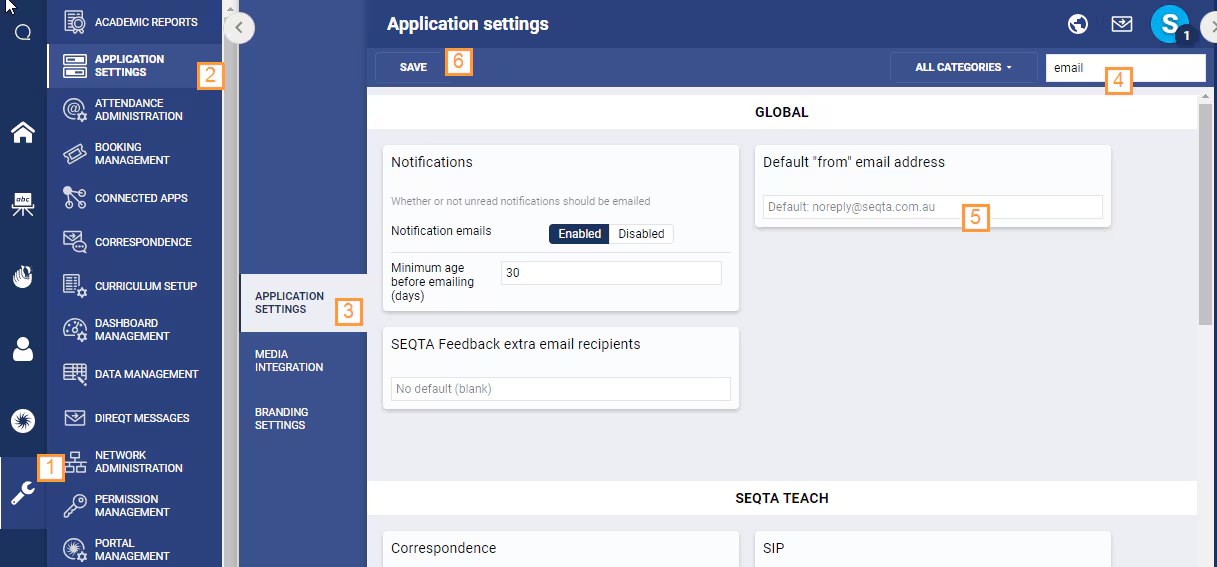
If some emails are not being receiving or are being flagged as spam, check the 'Default "from" email address' (steps below). The Default "from" email address needs to be authorised with the mail relay being used to send emails out from SEQTA. For example, if using the schools on-prem mail relay the email typically need to be a school email address, not the 'noreply@seqta.com.au'. If this is not the case the email may be flagged as spam by the recipients mail client.
If you don't know which mail relay you are using (eg. on-prem, SendGrid, Outlook etc.) please contact the service desk for assistance or check the mail headers on an email received from SEQTA.
- Go to the Administration Workspace > Application Settings > Application Settings
- Search for the word 'Email' in the top-left corner of the work area.
- Type an email address in the field for the setting 'Default "From" Email Address'. This email address is used when sending provision (eg. Welcome) emails from SEQTA, unread notification emails and email bounces. It's recommended it be a monitored email for this reason. However, this is not a requirement.
- Click Save.