TABLE OF CONTENTS
SEQTA Kiosk Docket Printer Setup
SEQTA Kiosk can work with an Epson TM-T88VI or TM-T88VII docket printer (wired or wireless network). The printer allows students to print a time-stamped receipt whenever they tag-in or tag-out using SEQTA Kiosk. Other printer brands and models are not supported. EPSON Docket Printers can be procured from many retail suppliers of point of sale technology (POS).
The EPSON Printer and Kiosk iPad will be deployed as a pair. (ie: one EPSON Printer per Kiosk iPad).
The EPSON TM-T88VI ships with an Ethernet UTP port or can be fitted with a UB-R04 or UB-R05 wireless card. The card has a USB micro connector on it, which will enable you to program the card's network settings. This can only be done using the software supplied by Epson. The printer also has a USB B connector but this cannot be used with the iPad. The USB B connector is used for printing from a computer or if a firmware upgrade is needed to the printer itself.
Later model printers like the TM-T88VII fitted with a USB-A connection can use the Epson WiFi dongle OT-WL06.
To enable paired deployment, the IP address of the EPSON Printer will need to be entered into the SEQTA Kiosk app settings. The EPSON Docket Printer will require a static IP reservation, that is assigned from the school network, to enable uninterrupted pairing with the Kiosk app. Epson provides Technical manuals that typically provide the networking information, whereas the User manuals cover day-to-day requirements. See the link below.
Once the printer is set up on the network the Kiosk app settings can be configured on the iPad. See the related articles.
NOTES:
- The printer and the Kiosk iPad need to be on the same subnet and using the same subnet mask. Complex or different sub-netting or routing configurations have been shown to cause printer connection issues and are not recommended.
- Other printer brands and models are not supported.
- The printer drivers are included in the SEQTA Kiosk software deployment and don't need to be installed separately.
- Here is the link to the Epson software and support area for the TM-T88VII: https://support.epson.net/setupnavi/?LG2=EN&OSC=WS&MKN=TM-T88VII&PINF=menu&linkflg=alllist
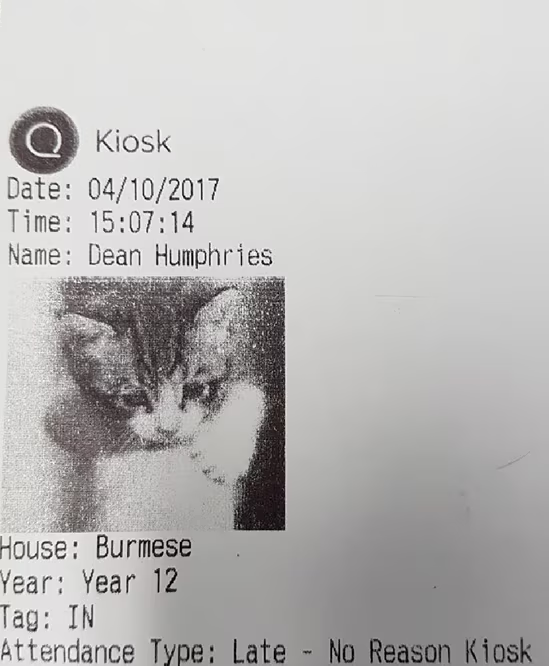
See below an example of the Kiosk printer output
Related articles:
Was this article helpful?
That’s Great!
Thank you for your feedback
Sorry! We couldn't be helpful
Thank you for your feedback
Feedback sent
We appreciate your effort and will try to fix the article