TABLE OF CONTENTS
- Teachers Attendance Roll Page
- Tutorial Visibility in SEQTA Engage and SEQTA Learn
- Notifications
- Related Articles:
Teachers Attendance Roll Page
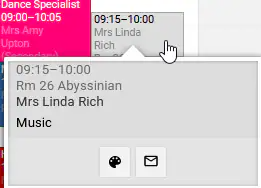
Prior to the attendance being processed, an indicator  (red triangle) will be displayed in the top-right corner of the cell on the attendance roll page. This is to indicate to the teacher that the student is scheduled for a tutorial. The hover-over text will display the tutorial details.
Once attendance has been processed, the tutorial icon  will be displayed on the teacher and student timetable.
Tutorial Visibility in SEQTA Engage and SEQTA Learn
A Tutorial Cell will be displayed on the student's timetable in SEQTA Learn and SEQTA Engage both before and after attendance has been processed. Once attendance has been processed, the Tutorial attendance icon  will appear in the timetable in Learn and Engage.
Notifications
Once attendance is processed, the student, parent, tutor and teacher will receive a Notification with the tutorial details. To access this, they will need to click on the notification icon in the top-right corner in SEQTA.
Related Articles:
Was this article helpful?
That’s Great!
Thank you for your feedback
Sorry! We couldn't be helpful
Thank you for your feedback
Feedback sent
We appreciate your effort and will try to fix the article