TABLE OF CONTENTS
Staff accounts can be created and managed directly in SEQTA. Staff accounts cannot be deleted through SEQTA Teach. However, they can have their access revoked, which will archive the staff record, preventing their name from showing in most areas in SEQTA. More information is available in the article Managing Accounts for Staff who Have Left.
Staff records managed in an external system (i.e. Synergetic) should be created in that system, then synced into SEQTA. They should not be created directly in SEQTA, this is to prevent multiple records being created for the same staff member should the code be different.
Failure to adhere to the steps above, will result in the creation of duplicate staff records due to the differing codes. Consequently these records will need to be merged to prevent any confusion. This service will incur a fee and our team will provide a quote accordingly.
Creating and Editing Staff Records
- Click on the Administration Workspace > Data Management > Staff
- Find the staff record and click to open the edit window. Alternately, click Add New Record to create new staff record.
Fill out the required fields outlined below then click Save.
Field name | Example | Description |
Code | JSMITH |
|
Salutation | Mr John Smith | The staff members full name: This is the name that will appear on reports, in the drop-downs in SEQTA and under permissions. |
| Firstname | John | Given name |
| Surname | Smith | Surname |
| Gender | Male | Gender |
Username | Username |
|
Password *Optional | Password |
|
| Campus | 'All Campus' |
|
The Next Step... Adding the Staff Account to a Permission Group
If the staff member will be roll marking or require additional permissions they will need to be added to a Permission group. The steps for this process can be found in the article Assigning Staff Permissions.
Staff will not see the '@' icon on their classes until they have been added to a Permission Group.
Deleting Staff Records
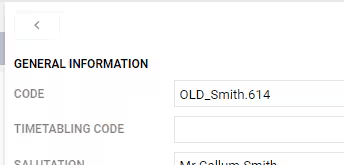
It is not possible to delete staff accounts through SEQTA Teach. This is to prevent the loss of data linked to the staff record that may result if it were to be deleted. The recommended process for handling unwanted staff records is to prefix the staff code with 'OLD_'.
If there is more than one account for a staff member (for example after a name change) please notify the SEQTA Service Desk as soon as possible stating the current account code and requesting the accounts be merged. Merging cannot be done through the SEQTA Teach interface.
Related Articles:
Was this article helpful?
That’s Great!
Thank you for your feedback
Sorry! We couldn't be helpful
Thank you for your feedback
Feedback sent
We appreciate your effort and will try to fix the article