The steps below outline how to move a Direqt message, or move Direqt messages to the Trash.
Direqt messages cannot be completely deleted from SEQTA, so as to keep record of communications in case they need to be referred back to at a later point.
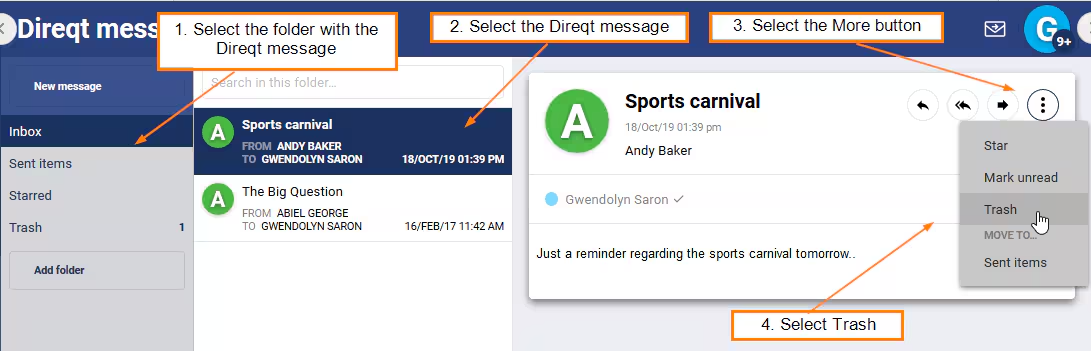
To move a single Direqt message to the trash:
- Select the folder with the Direct message that needs to be placed in the trash.
- Select the Direqt message that needs to be moved.
- Click the ellipsis button "..." in the top-right corner of the Direqt message and select Trash.
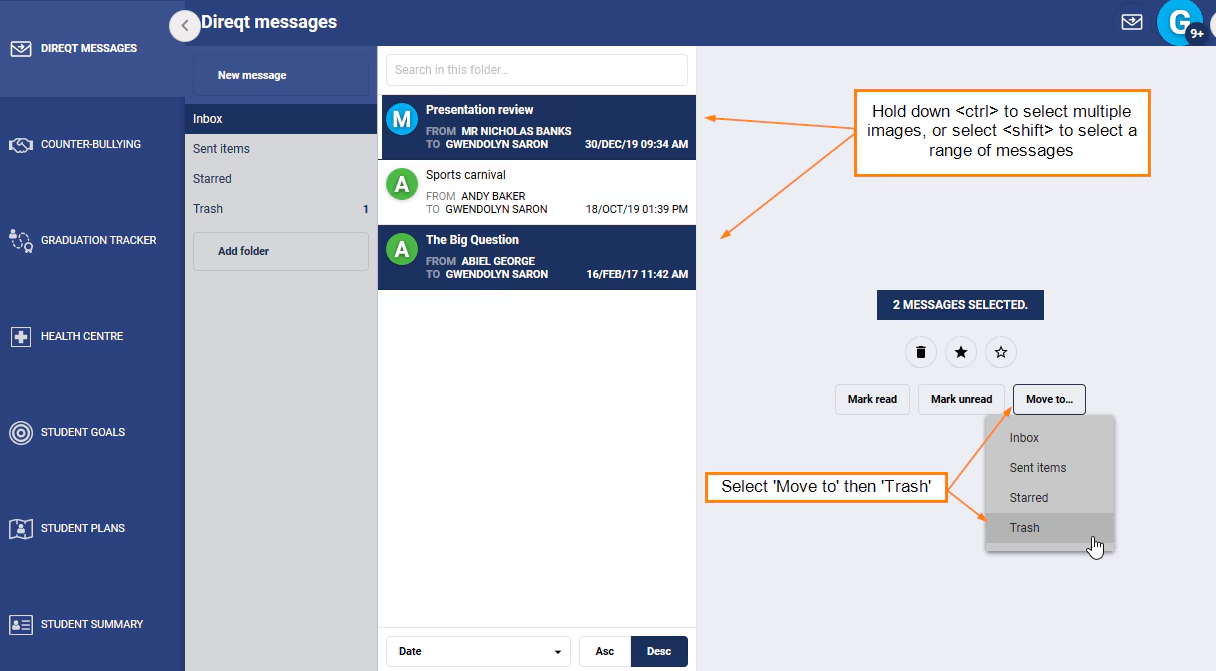
To move multiple Direqt messages into the trash:
- Select the folder with the Direct messages that need to be placed in the trash.
- Select the Direqt messages that need to be moved. To select multiple messages hold down the <control> key, to select a range of Direqt messages hold down the <shift> key.
- Click the more '...' button in the top-right corner.
- Select Trash.
Was this article helpful?
That’s Great!
Thank you for your feedback
Sorry! We couldn't be helpful
Thank you for your feedback
Feedback sent
We appreciate your effort and will try to fix the article