TABLE OF CONTENTS
- Why can't I download images in Direqt messages?
- Can I delete Direqt message from the Trash?
- How do I download files attached to Direqt messages
- How do I know when to check my Direqt messages?
- Can merge fields be used with Direqt messages?
- Is there a quick way to Direqt message a class?
- Why can't I include an attachment when sending a Direqt message through the Correspondence page?
Why can't I download images in Direqt messages?
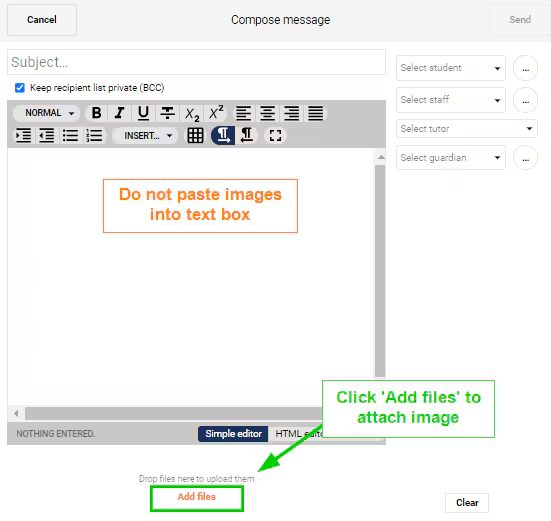
This occurs when images are pasted into the text box. For the images to be downloadable they will need to be attached using the 'ADD FILES' button.
Can I delete Direqt message from the Trash?
No, it is not possible to completely delete Direqt messages through the interface, they can only be added to the trash. This is to ensure records are kept of any Direqt messages received by an individual.
How do I download files attached to Direqt messages
The downloading of attachments is handled by the web-browser (eg. Chrome, Firefox). Most web-browsers have the settings set to prompt if the user if would like to 'Open' or 'Download' the file. If this does not occur please report to the schools IT for assistance.
If the setting mentioned above is not set correctly, the following instructions will allow the file to be downloaded until such time as the setting for the web-browser is changed.
- Firefox: click the icon to play the file, then right-click on the speaker or volume icon. Next, select 'Save audio as' from the right-click menu
- Chrome: right-click the icon, then choose 'Save link as...'
How do I know when to check my Direqt messages?
When you receive a new Direqt Message, a new notification will appear in the top right corner. If unread notification emails are enabled, an email will also be generated if the Direqt message notification is not cleared within the set number of days.
Can merge fields be used with Direqt messages?
Yes. However, this option is only available through the Correspondence page.
Is there a quick way to Direqt message a class?
Yes, this can be done through the Marks book or Attendance roll page by clicking on the Direqt message button.
Why can't I include an attachment when sending a Direqt message through the Correspondence page?
The option to include attachments is not available when sending Direqt messages through the Correspondence page. However, it can be done through the Direqt messages page which can be accessed through the 'Teaching workspace',' Home workspace' and 'Pastoral care workspace'. Alternatively, click on the Direqt message icon in the top-right corner.
Was this article helpful?
That’s Great!
Thank you for your feedback
Sorry! We couldn't be helpful
Thank you for your feedback
Feedback sent
We appreciate your effort and will try to fix the article