TABLE OF CONTENTS
Checking if a Direqt Message has been Read (Viewed)
The following steps outline how to check if you have previously viewed a Direqt message, and how to check if a recipient has read your Direqt message.
- Select the Home Workspace > Teaching Workspace or Pastoral Care Workspace > Direqt Messages.
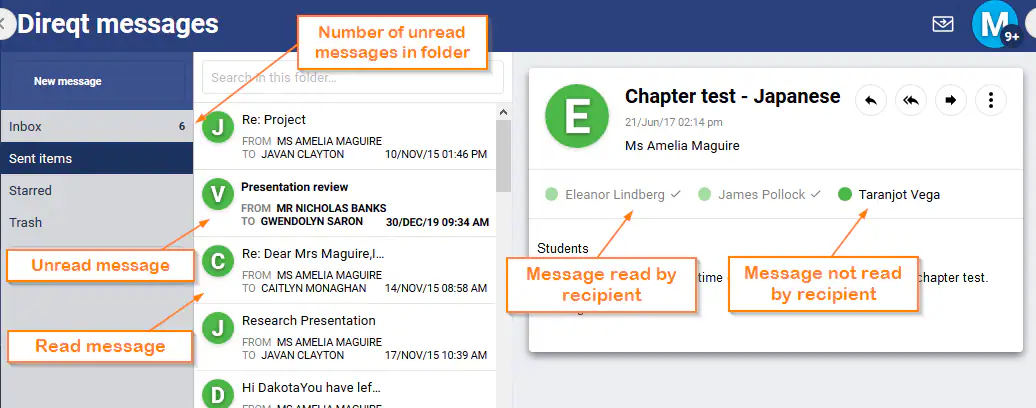
- The number of unread direct messages displays next to the folder name.
- Selecting a folder will display unread messages in bold, whereas unread messages display in standard text.
- To display unread messages first, select Read from the drop-down at the bottom of the list of messages, and set as Asc (ascending order).
- Selecting a Direqt message will display the names of the recipients, if they have read a message a tick displays next to the name.
Identifying which User Type Sent a Message
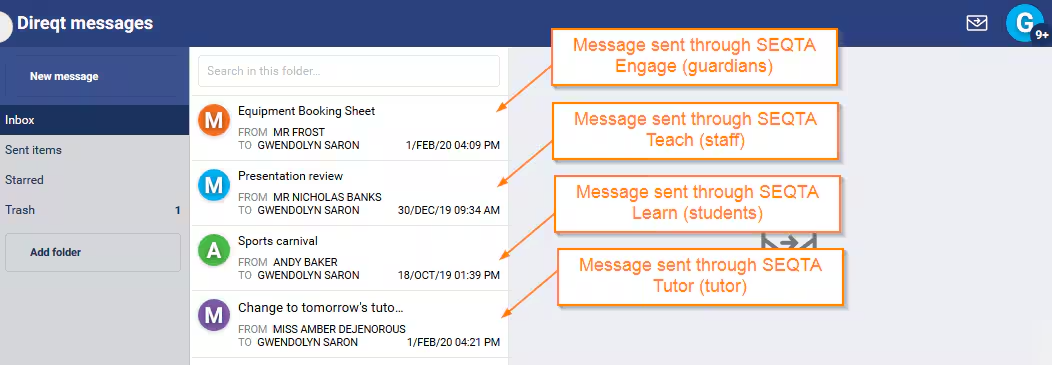
The profile icon colour indicates which user type sent a message. The colours match the SEQTA Teach, SEQTA Learn and SEQTA Engage icons
- SEQTA Engage (guardians) = Orange
- SEQTA Teach (staff) = Blue
- SEQTA Learn (students) = Green
- SEQTA Tutor (tutors) = Purple
Was this article helpful?
That’s Great!
Thank you for your feedback
Sorry! We couldn't be helpful
Thank you for your feedback
Feedback sent
We appreciate your effort and will try to fix the article