Results and Teacher submissions can be entered directly through the Marks book. Whereas teacher annotations, Rubrics marking and WISP annotations can only be entered through Focus Mode.
Information on using the Assessment availability track to display results and rubrics in SEQTA Learn and SEQTA Engage are available here.
- Go to the Teaching Workspace > Timetable > My Classes/Traditional/Calendar.
- Click on the 'Marks Book' icon for the class.
- Click in the cell to enter a result for the student / assessment.
- Click in the 'Files' column to the right of the assessment column for the student / assessment.
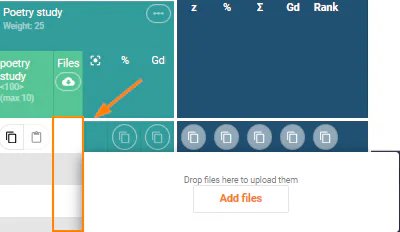
- Click 'Add files', select the file and click 'OK'.
- To enter annotations, mark Rubrics or annotate WISPs click on the Focus icon
 to enter Focus mode.
 - Click 'SAVE'.
Was this article helpful?
That’s Great!
Thank you for your feedback
Sorry! We couldn't be helpful
Thank you for your feedback
Feedback sent
We appreciate your effort and will try to fix the article