TABLE OF CONTENTS
- Step One: Add Term 2 to the Semester 2 Timetable
- Step 2: Run a Sync (Only Required for Externally Managed Timetables)
Schools may set the end of the semester one timetable early by a week or two while the reporting process is completed. If some or all of the students will be attending classes for those weeks, they will need to be added to the semester two timetable.
Step One: Add Term 2 to the Semester 2 Timetable
- Go to the Administration Workspace > Timetable Management > Cycle Period Setup.
- Change the start date of the Semester 2 timetable period to include the last couple weeks of Term 2 and click Save.
- Open the Manage Days tab and select the semester two timetable period.
- In the top-right of the work area add an entry for Term 2 under the 2021S2 timetable, set the term number for each term so they display correctly.
- Select the day drop-down for the first day of term, then click the arrow to fill the rest of the term.
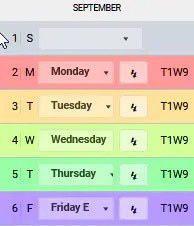
- Check all the days and make any adjustments required. Once this is done click 'SAVE'.
Step 2: Run a Sync (Only Required for Externally Managed Timetables)
If the timetable data is synced from an external system or uploaded to the Sync UI page, a sync will need to be run for changes to appear.
- Manage Sync tab, create or add a sync profile for the timetable period and save any changes. See: Rolling Out a Timetable and Setting up the Nightly Sync (Externally Managed Timetables Only)
- Click 'Save' to keep any changes.
- Ensure the correct timetable period is selected then select Run now > From Today. Give the sync 5-10 mins to run, no notification will be received once it's complete, however, the classes should appear on the teachers' timetable.
- Detailed steps for the above process are available in the Timetable setup article, under the sub-heading 'Externally Managed Timetables (i.e. Synergetic, MAZE).
Was this article helpful?
That’s Great!
Thank you for your feedback
Sorry! We couldn't be helpful
Thank you for your feedback
Feedback sent
We appreciate your effort and will try to fix the article