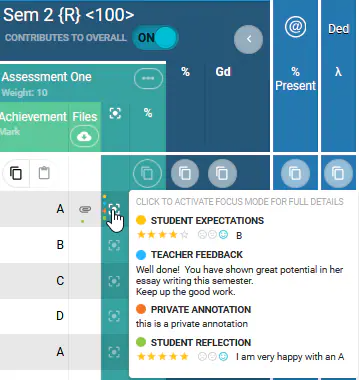
When viewing the SEQTA marksbook, hovering over the Focus mode icon  will display the engagement indicators to allow teachers to see at-a-glance the feedback, expectations and reflections entered for a student for the assessment.
- Yellow: Expectations entered by the Student (PRE Assessment)
- Blue: Public Annotation (Teacher Feedback)
- Orange: Private Annotation (Teacher Feedback)
- Green: Reflections entered by the student (POST Assessment)
Image below: Example showing engagement indicators.
Related files:
Was this article helpful?
That’s Great!
Thank you for your feedback
Sorry! We couldn't be helpful
Thank you for your feedback
Feedback sent
We appreciate your effort and will try to fix the article