TABLE OF CONTENTS
- Displaying the timetable in Learn and Engage
- Displaying Courses and Assessments in Learn and Engage
- Setting a timetable as visible in Learn and Engage
Timetables can be hidden from students and parents until such time as the school has finalised the timetable. If a timetable period is 'hidden' then parents and students will not see any course or assessment information for classes in the timetable period (see below section on bridging for more information).
Displaying the timetable in Learn and Engage
Classes will only appear on the timetable if the following three conditions are met:
- The options Visible to Students and Visible to Parents must be selected (see above for steps).
- The student status needs to be set to full.
- For the timetable to show in SEQTA Engage contact record needs to be linked to the Student Record and flagged for SEQTA Engage access.
- The timetable pages needs to be set to display in SEQTA Learn and SEQTA Engage in the Application settings.
Displaying Courses and Assessments in Learn and Engage
- There needs to be a programme attached to the class. To check this look for the "%" icon on the class if it doesn't show this indicates there is no programme attached.
- The assessment needs to be configured to be visible in SEQTA Learn and SEQTA Engage.
- The Courses and Assessment page needs to be set to display in SEQTA Learn and SEQTA Engage in the Application settings.
Setting a timetable as visible in Learn and Engage
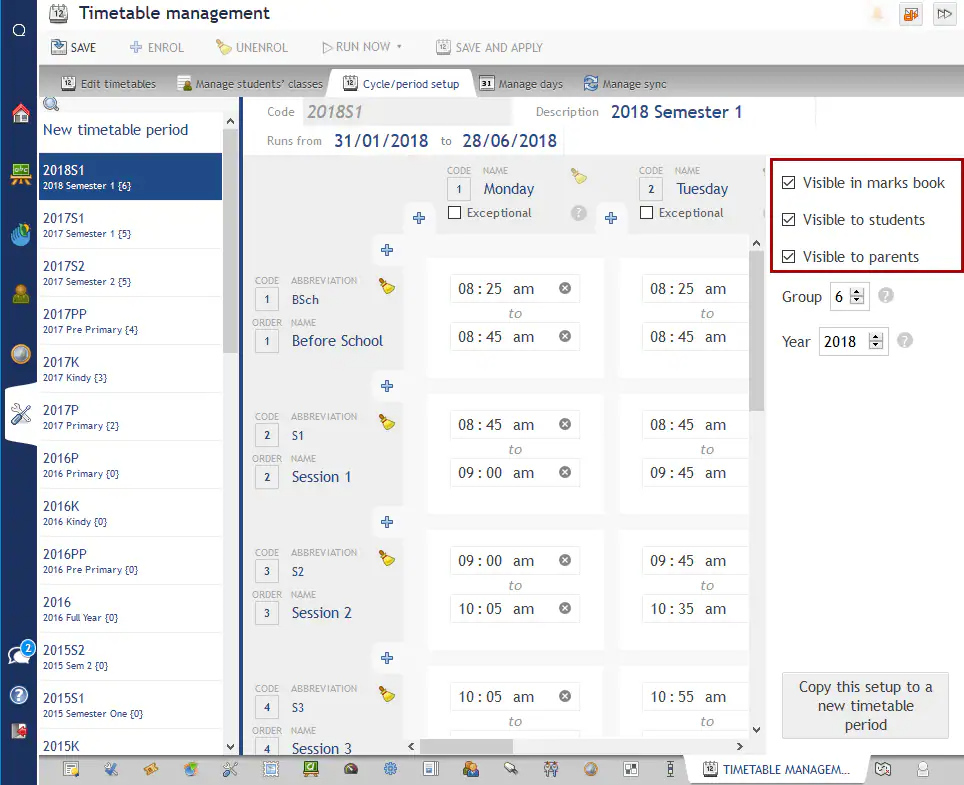
- Go to the Administration Workspace > Timetable Management > Cycle/Period Setup.
- Select the applicable timetable period.
- Set the Visible to Parents and Visible to Students.
- Click Save.
Was this article helpful?
That’s Great!
Thank you for your feedback
Sorry! We couldn't be helpful
Thank you for your feedback
Feedback sent
We appreciate your effort and will try to fix the article