TABLE OF CONTENTS
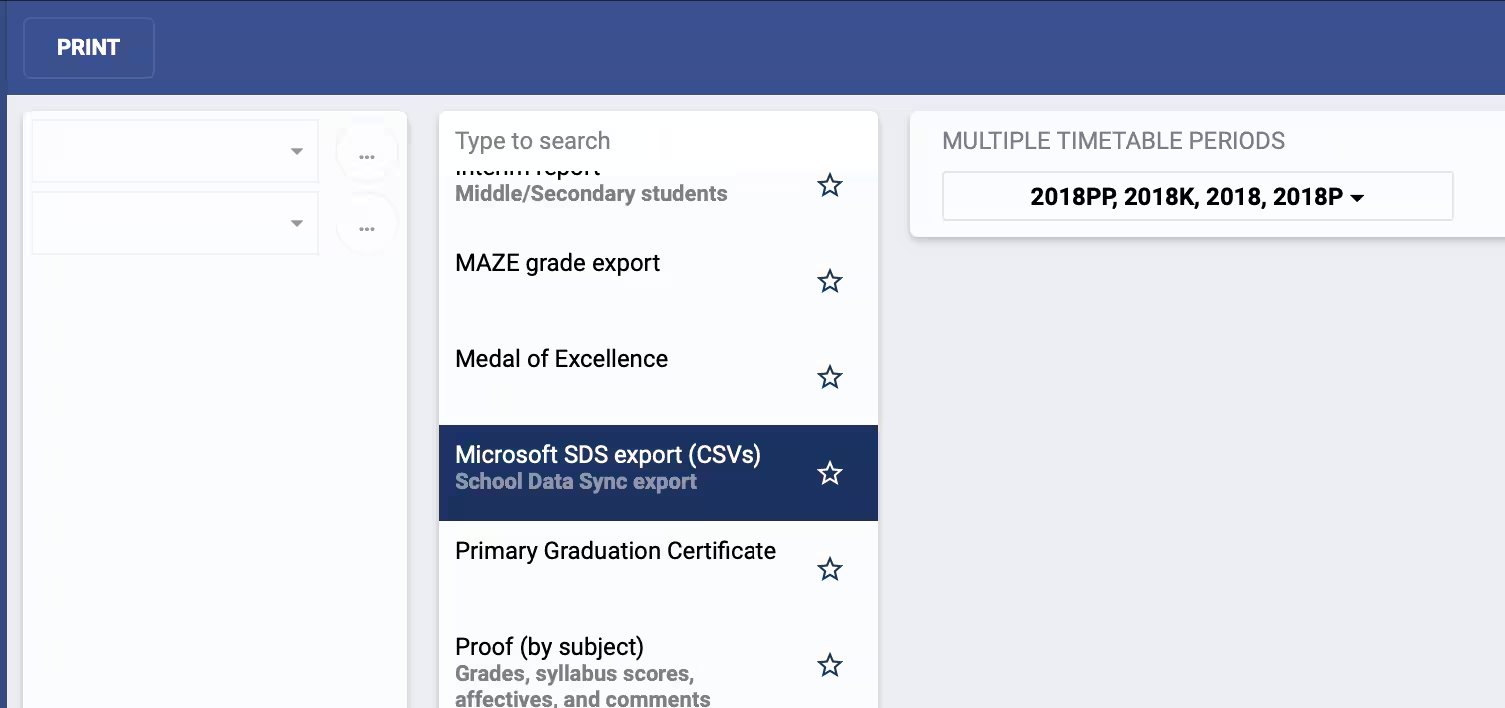
This report produces single ZIP file with all classunits, students and staff for the selected terms. It is designed to upload to Microsoft School Data Sync.
- Go to the Administration workspace > Academic reports > Reporting
- Select the report called Microsoft SDS export (CSVs)
- Select the timetable periods for the classes which need to be included
- Click Print then select Click here to access your document
Data Mappings
Section.csv
SIS ID | Section Name | TERM SIS ID | Term Name | Course SIS ID | Course Name | Course Description |
|---|---|---|---|---|---|---|
| classunit.code | classunit.name | term.code | term.description | subject.code | subject.name | subject.description |
teacher.csv
SIS ID | Username | First Name | Last Name | Teacher Number |
|---|---|---|---|---|
| staff.code | staff.username | staff.firstname | staff.surname | staff.code |
student.csv
SIS ID | Username | First Name | Last Name | Student Number |
|---|---|---|---|---|
| student.code | student.username | student.firstname | student.surname | student.code |
Additional information
All classunits per term are exported that have at least a single student still enrolled in the classunit (i.e. has removed=null, is FULL and has a username in SEQTA)
For a section, the teachers come from the staff from any future classinstance, that means the class has to have at least one future classinstance. Only staff are considered that have a username. This means there could be sections with students but no teacher. There could be sections with more than one teacher. The result may be different depending on the day of the export.
All SIS IDs are taken from the CODE in SEQTA.
Was this article helpful?
That’s Great!
Thank you for your feedback
Sorry! We couldn't be helpful
Thank you for your feedback
Feedback sent
We appreciate your effort and will try to fix the article