TABLE OF CONTEBTS
Staff can log into SEQTA Learn as a specific student or log into SEQTA Engage as a Student's Parent/Contact.
The Masquerade feature is only available if (a.) The staff member has sufficient permissions and (b.) The account for the selected Student or Parent has been setup (i.e. has a Username and Password).
Masquerade Permissions
The following Permissions are required to use the Masquerade functionality:
- 'MASQ: STS' - Can masquerade as student in SEQTA Learn
- 'MASQ: CTS' - Can masquerade as contact in SEQTA Engage
Masquerading as a Student or Parent/Contact
The steps for using the Masquerading as a Student or Parent/Contact are as follows.
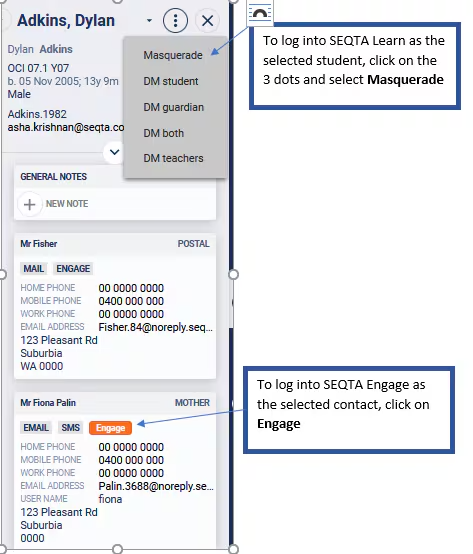
- Select the student name in the SIP.
- To masquerade as Student, click on the 3 vertical dots and select the Masquerade button.
- To masquerade as a Contact (Parent) click the SEQTA Engage icon next to the contact name in the SIP.
Related Articles:
Was this article helpful?
That’s Great!
Thank you for your feedback
Sorry! We couldn't be helpful
Thank you for your feedback
Feedback sent
We appreciate your effort and will try to fix the article