TABLE OF CONTENTS
- Multiple coordinators can be setup in 2 ways depending on your schools current Sync Setup:
- Setting up multiple coordinators for Sync Classic
Multiple coordinators can be setup in 2 ways depending on your schools current Sync Setup:
- For schools using Sync Classic you will be required to manually setup the multiple coordinators.
- For schools using Sync-Next you can opt to Sync through your multiple coordinators, doing so will require action from our Sync Team, please contact the Support Team with this request. Alternatively you can also manually set up your multiple coordinators in the same fashion as Sync Classic users.
Setting up multiple coordinators for Sync Classic
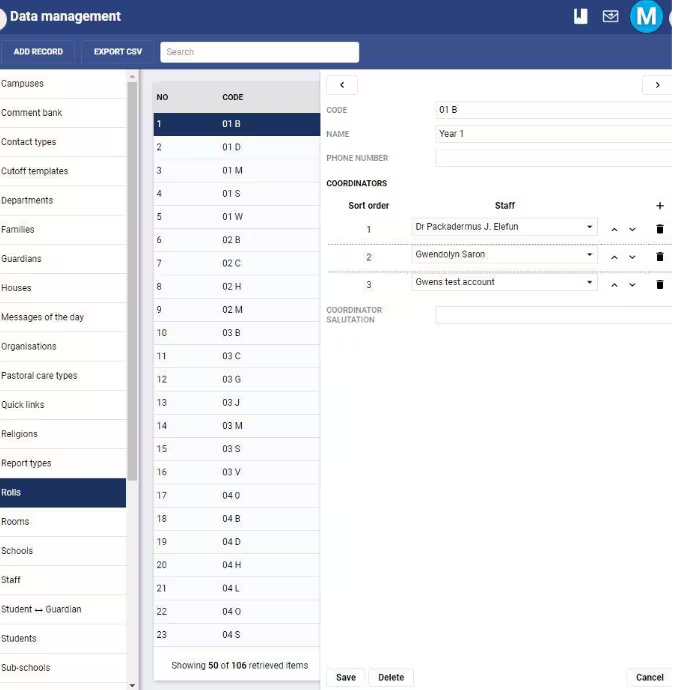
To add multiple coordinators to a group, follow these steps
1. In SEQTA Teach, enter Administration Workspace > Data management
2. Select the group type of the group you want to add multiple coordinators to. You
can add multiple coordinators to the following:
• Campus
• House
• Roll group
• Sub school
• Years
3. Navigate to the group you want to add multiple coordinators for, and in the
Coordinators section, add your coordinators in using the +
4. Determine the order in which you want them to appear in report assets and
academic reports
5. Save your changes.
Was this article helpful?
That’s Great!
Thank you for your feedback
Sorry! We couldn't be helpful
Thank you for your feedback
Feedback sent
We appreciate your effort and will try to fix the article