TABLE OF CONTENTS
- Pastoral Care Note Management Permissions
- Permissions for Restricting PC notes and Using Restricted PC Types
The below permissions grant access to various Pastoral care note management functions. In addition to the Pastoral care note management permissions, Student Summary Permissions to view the sub-pages 'In Detail' or 'Qualitative Analysis' are required to view, edit and delete notes.
IMPORTANT: Notes restricted to 'Me Only' are still visible to staff with the Admin permission 'PC: ALL RES'.
Pastoral Care Note Management Permissions
| Permission | Function | Dependency (only works if the below permission exists) | Notes |
| PC: EDIT ALL | Edit all Pastoral care notes that can be seen. | PC:UN RES and/or PC ALL RES STS + STS:Detail | All staff can view and edit Pastoral care notes they created. |
| PC: ENTER MULTI | Save one Pastoral care note to multiple students at a time | PC: ENTER UNRES | To save a PC note to multiple student records at once, click on the Save many button at the bottom of the SIP |
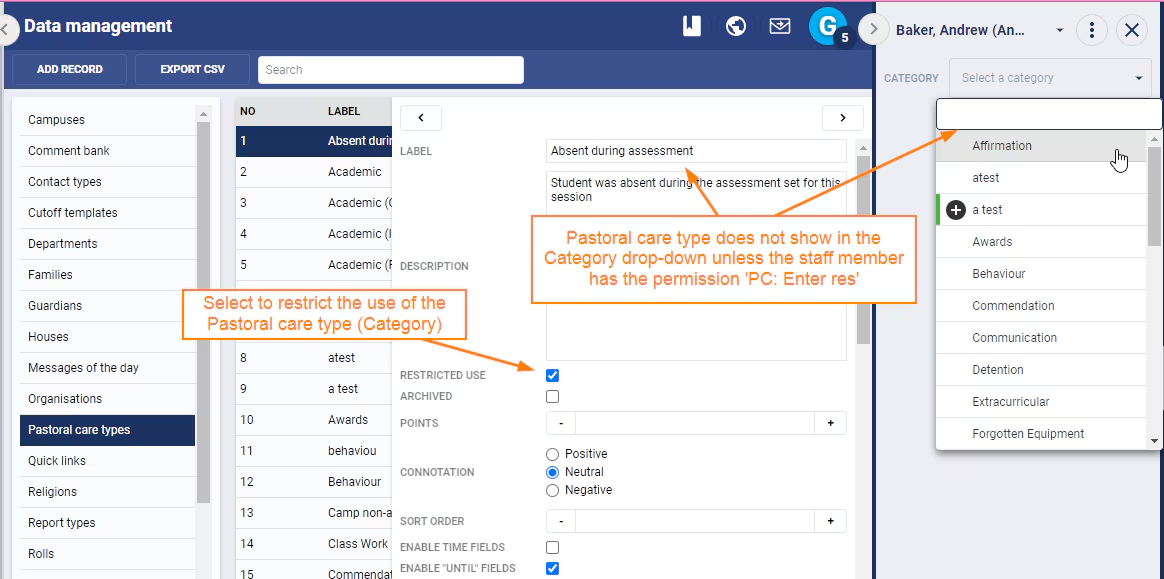
| PC: ENTER RES | Enter and edit Pastoral care notes using restricted Pastoral care types (Categories). | None | |
| PC: ENTER UNRES | Enter and edit Pastoral care notes, using non-restricted Pastoral care types | None | |
| PC: ALL RES | View all restricted PC notes | STS + STS:Detail (or STS: Qualitative) | |
| PC: CAN BE RES | This determine whether a Permission group displays in the SIP under the "restricted to" drop-down list | None | |
| PC: UNRES | View unrestricted PC notes | STS + STS:Detail (or STS: Qualitative) |
Permissions for Restricting PC notes and Using Restricted PC Types
These permissions control access to the Pastoral care notifications functionality when creating a pastoral care note. The email setting is also used to enable, sending of Direqt message notifications.
- 'EMAIL: STAFF' - Send Pastoral Care Alerts to staff (also requires base permission 'Email')
- 'EMAIL: CONT' - Send Pastoral Care Alerts to parents (also requires base permission 'Email')
- 'SMS: PC'- Send Pastoral Care Alerts via SMS (also requires base permission 'SMS')
- 'PC: ENTER RES' - Create Restricted Pastoral Care Notes. Select Restricted Pastoral Care Types when creating notes.
Image below: Restricted to option option and indicator for creating a Restricted Pastoral Care Note.
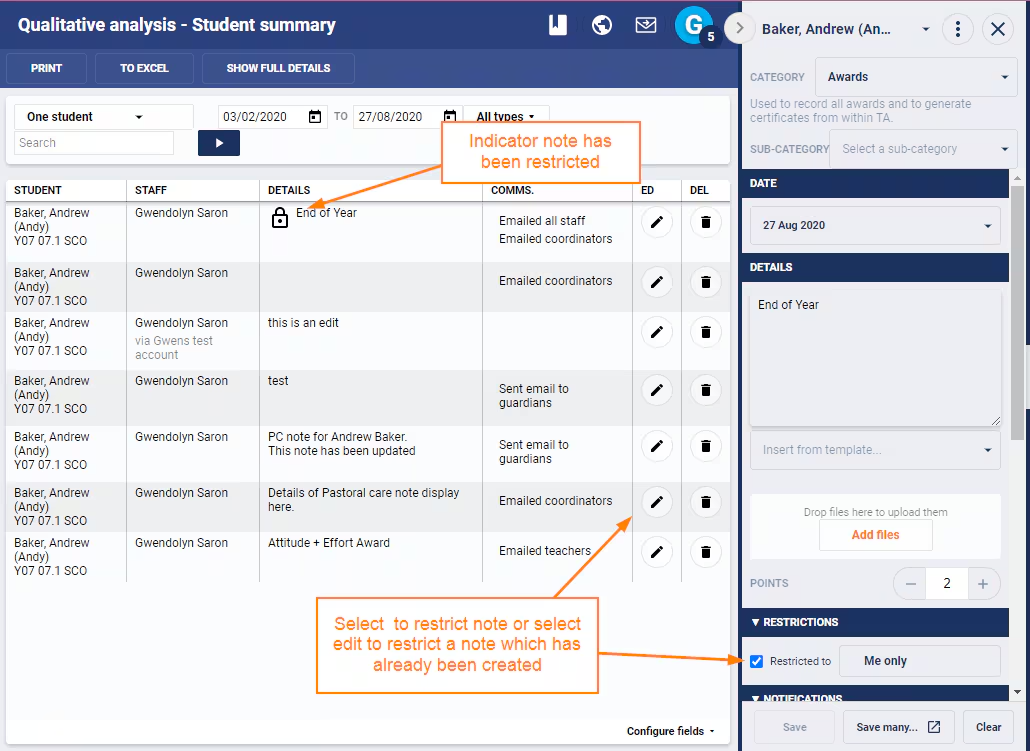
Image below: Creating notes using a 'Restricted Use' Pastoral Care Type.
Was this article helpful?
That’s Great!
Thank you for your feedback
Sorry! We couldn't be helpful
Thank you for your feedback
Feedback sent
We appreciate your effort and will try to fix the article