TABLE OF CONTENTS
Appointment and Event Permissions in SEQTA Teach
The below Permissions determine which staff can Create and configure Appointments and Events in SEQTA Teach. It is not possible to enable permissions for Appointments or Events independent of each other.
Please refer to this article for information on private events and appointments
| Permission | Function |
| EVENTS:ADMIN | Create and manage appointments and events in SEQTA Teach on behalf of any staff member |
| EVENTS:EDIT | Create and manage appointments and events on your own Calendar |
SEQTA Learn and SEQTA Engage Application settings
Access to create Appointments in SEQTA Learn and SEQTA Engage is managed through Application settings, not Permissions.
Students and Guardians can only create Appointments. However, they can be invited to both Appointments and Events by staff through SEQTA Teach.
- Go to the Administration Workspace>Application settings>Application settings (Admin access required).
- Search for Events.
- Configure the options in the Calendar Events editing pane. SEQTA Learn and SEQTA Engagesettings are independent of each other; there are 2 editing panes, one in each category.
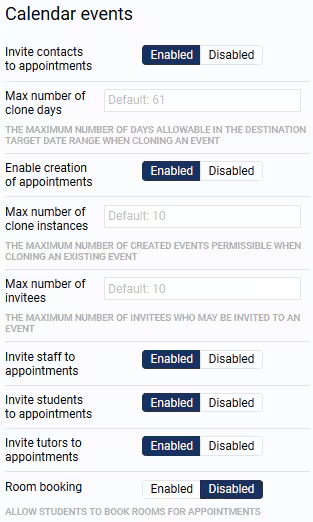
- Click Save.
Was this article helpful?
That’s Great!
Thank you for your feedback
Sorry! We couldn't be helpful
Thank you for your feedback
Feedback sent
We appreciate your effort and will try to fix the article