The below report includes the web browser login history for Staff, Students and Guardians.
Logins to SEQTA Engage and SEQTA Learn via the device apps are not counted in this report.
If students are selected when printing the report, it will also include the login history for their guardians.
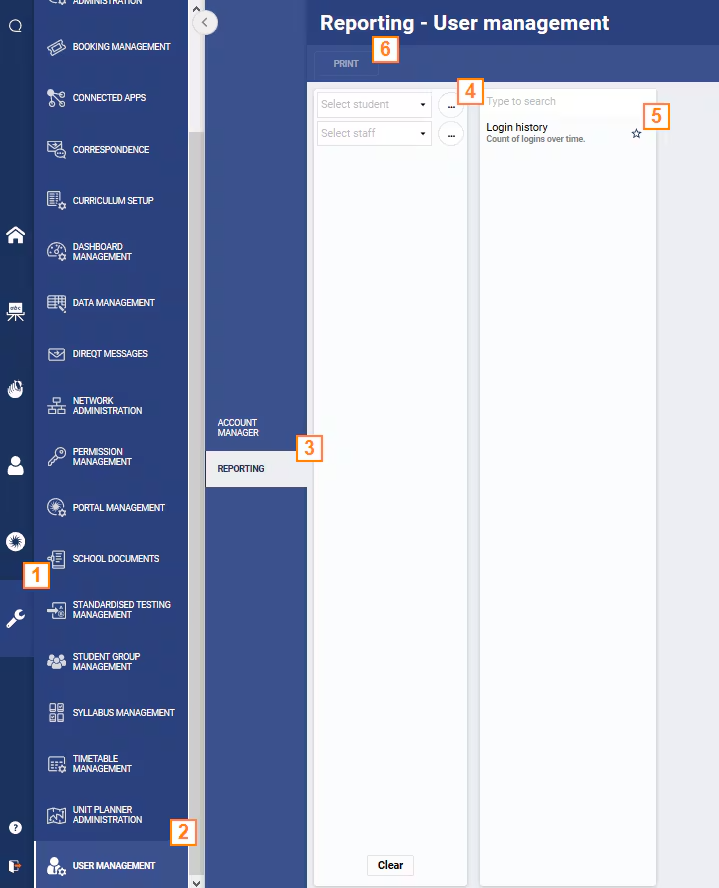
- Go to the Administration workspace.
- Select the page User management.
- Select the sub-page Reporting.
- Select the applicable staff or students and the required date range.
- Select the report Login history or Login history (CSV).
- Select Print then Click here to access your document.
- If the report is sent to the background for processing, watch for a notification of completion in the top-right corner.
Was this article helpful?
That’s Great!
Thank you for your feedback
Sorry! We couldn't be helpful
Thank you for your feedback
Feedback sent
We appreciate your effort and will try to fix the article