The Global setting 'Folios' determines whether or not to enable Folios (SEQTA Teach). In addition to this, the 'Folios Page' will need to be enabled for students to create and share Folios (SEQTA Learn), and for guardians to view 'Folios' which they been given access to (SEQTA Engage).
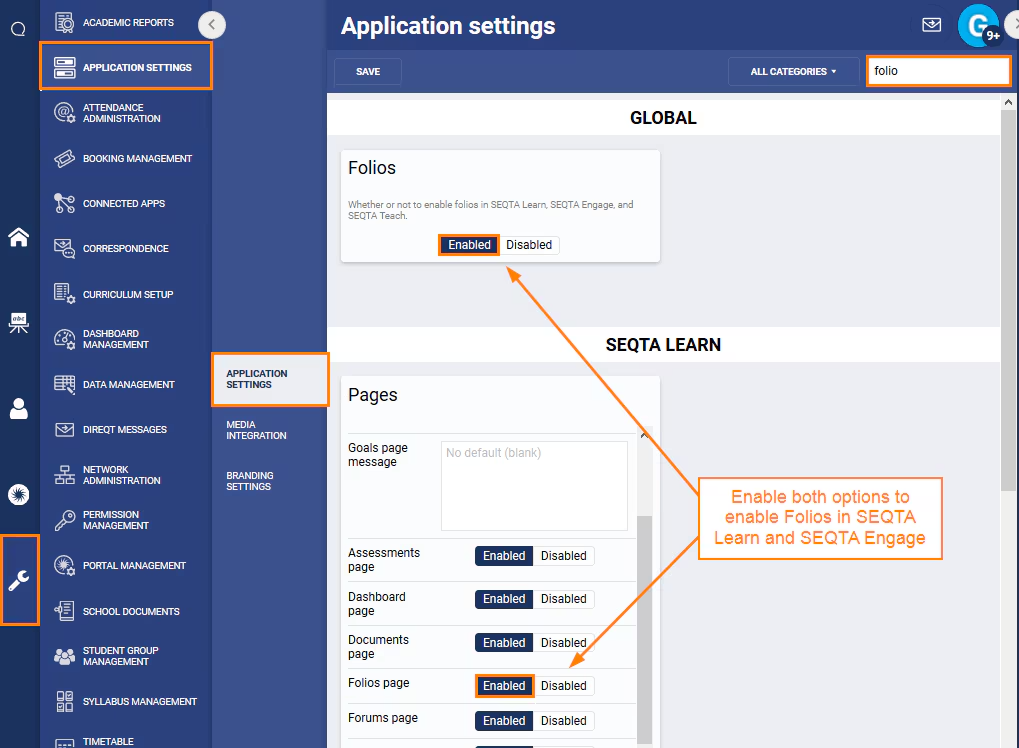
- Go to Administration Workspace > Application Settings > Application Settings.
- Search for the word 'Folios' (without the quotes).
- To allow teachers to view student Folios, change the setting 'Folios' to Enable.
- To allow students to view and create Folio's, through SEQTA Learn, change the setting 'Folios page', under the category SEQTA Learn, to Enabled.
- To allow guardians to view Folio's, through SEQTA Engage, change the setting 'Folios page', under the category SEQTA Engage, to Enabled.
- Click Save to keep the changes.
Was this article helpful?
That’s Great!
Thank you for your feedback
Sorry! We couldn't be helpful
Thank you for your feedback
Feedback sent
We appreciate your effort and will try to fix the article