TABLE OF CONTENTS
- Introduction
- Accessing and configuring Steps and Levels setup
- Configuration options and field definitions
Introduction
Steps and levels can be used as rewards or sanctions and will assign an increasing (positive) or decreasing (negative) value to pastoral care types.
Please note that steps and levels are set independently for SEQTA Engage, SEQTA Learn, and SEQTA Teach
Accessing and configuring Steps and Levels setup
- Go to the Administration workspace > Application settings
- Type 'levels' (without the quotes) in the search box in the top-right corner
- Set the date-range and Pastoral care types for Steps and Levels, see table below for more information. Be sure to check the settings under all three categories, SEQTA Engage, SEQTA Learn, and SEQTA Teach
- Click Save
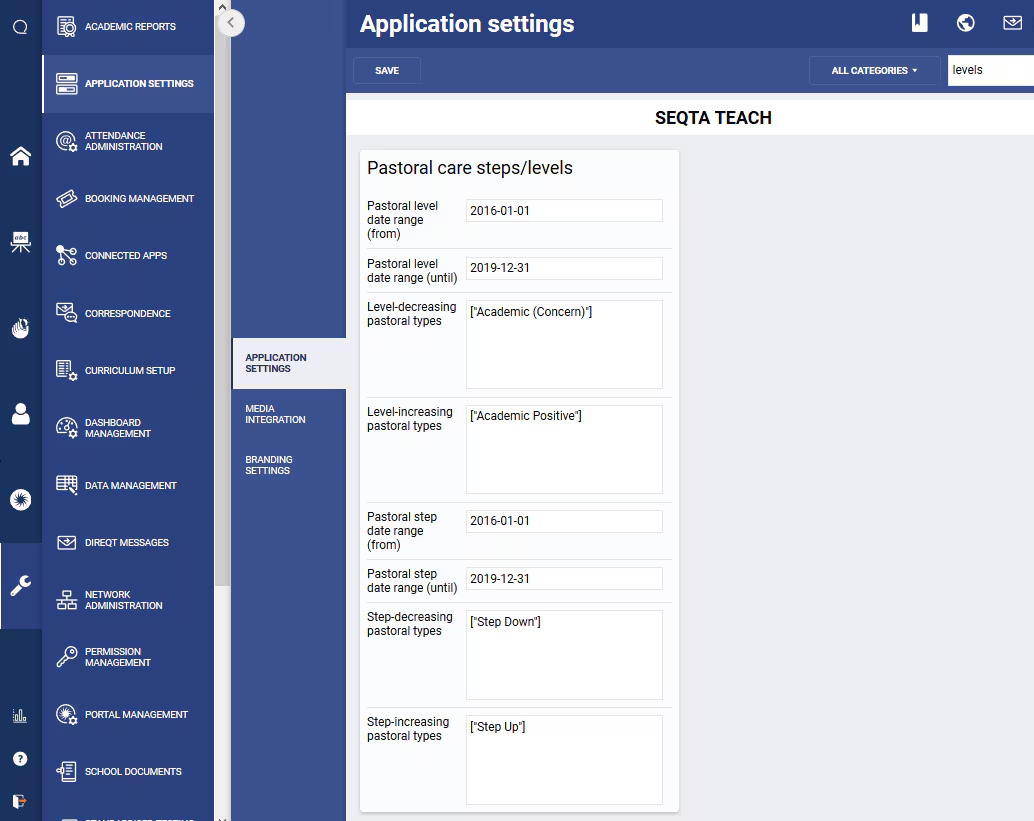
Configuration options and field definitions
| Setting | Function |
| Pastoral care notes created within the specified date range will be included in the value displayed on the "Student summary" page. |
| Assign pastoral care types to a negative value (ie. -1) or a positive value (ie. +1). These must be spelled exactly as they are under the Pastoral care type itself. In addition, they need to be entered in the following format: ["Uniform","Lateness"] |
| Only pastoral care notes created within the specified date range will be included in the value displayed on the "Student summary" page. |
| Assign pastoral care types to a negative value (ie. -1) or a positive value (ie. +1). These must be spelled exactly as they are under the Pastoral care type. In addition, they need to be entered in the following format: ["Uniform","Lateness"] |
Was this article helpful?
That’s Great!
Thank you for your feedback
Sorry! We couldn't be helpful
Thank you for your feedback
Feedback sent
We appreciate your effort and will try to fix the article