TABLE OF CONTENTS
- Images for Printouts and Letters
- Images for Email and Direqt Messages
- Programme Cover Page
- Background Image and Logos for the Login Pages
- Cover Page Image Format
This article outlines the requirements for images used for customising printouts and reports, correspondence and the logo in SEQTA Learn and SEQTA Engage.
Schools that don't have a programme that allows saving in the required format (i.e. Illustrator, Photoshop, InDesign, Affinity Designer etc.) can use free software available, for example Inkscape. https://inkscape.org/
Images for Printouts and Letters
- File type: Scalable Vector Graphic (.SVG) format Note: opening a .jpg or .png then saving as a supported format will not create images that are scalable or of high quality.
- Images should be trimmed to minimise the amount of 'white' space surrounding the image.
- Images should have all the elements 'grouped' and any fonts should be converted to 'paths'.
Images for Email and Direqt Messages
Images (banners etc.) for emails need to be stored on an externally accessible web-server.
- File type: Portable Network Graphic (.png) format
- PNG images should be provided on a transparent background
- The recommended pixel image width x height size is set is 600 px X 300 px. The required width size is 600 pixels.
- The image height can vary between 100 px - 300 px
Programme Cover Page
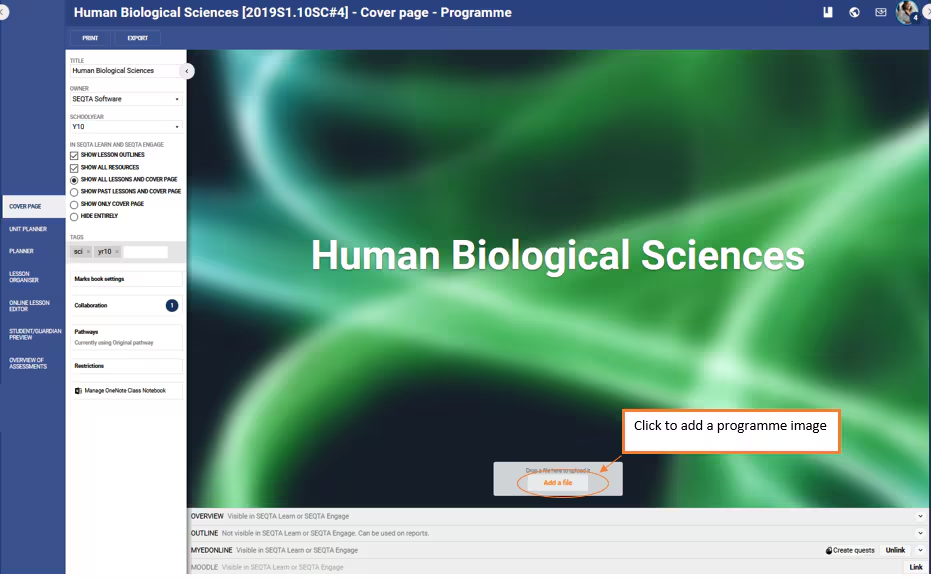
Images will display nicely on the 'Cover Page', however they will always be blurred when viewed through SEQTA Learn and SEQTA Engage. This was 'by design' (i.e. a styling choice), to give feedback regarding this feature please access the SEQTA Community Forums Guide.
Background Image and Logos for the Login Pages
Please refer to the article Branding Login Pages for steps on how to upload Logos and backgrounds for the login pages.
Test your image across multiple screen sizes to ensure your key content remains visible and legible.
- File type: .png format
- Background image: scale the image to 1920x1080 - images smaller than 1024x768 will be blurred.
Tips:
- For photographs, use .jpeg images and dial up the compression as high as possible without losing quality.
- If your image is mainly solid colours and has text or crests on it, consider using .png, as it more effectively compresses large areas of solid colour
Cover Page Image Format
The recommended format is either a .jpeg or .png, .gif files are also accepted however they tend to have a larger file size.
Blurred or blank images
Low quality images may be blurred in SEQTA Teach, SEQTA Learn and/or SEQTA Engage. This effect may also appear when loading an image with a large file size in addition to a blank background.
To avoid issues a good image size for viewing on the web is no bigger then 70Kb.
Related Articles
Was this article helpful?
That’s Great!
Thank you for your feedback
Sorry! We couldn't be helpful
Thank you for your feedback
Feedback sent
We appreciate your effort and will try to fix the article