TABLE OF CONTENTS
- Permission Required to Upload Backgrounds
- Uploading backgrounds into SEQTA Teach
- Image Quality (File Type and Size Requirements)
SEQTA Teach provides the option for school's to import backgrounds for staff to use in SEQTA Teach. The background need to be uploaded by the school's SEQTA Administrator after which point staff will be able to select it through their Dashboard.
Permission Required to Upload Backgrounds
The permission required to upload background is 'DATA:EDIT'. This is a high level administration permission and should be granted to SEQTA Admins only.
Uploading backgrounds into SEQTA Teach
- Go to the Administration Workspace > Application Settings > Branding Settings.
- Click Add Files and add one or more backgrounds. Click on the bin icon to remove a background.
- Click Save.
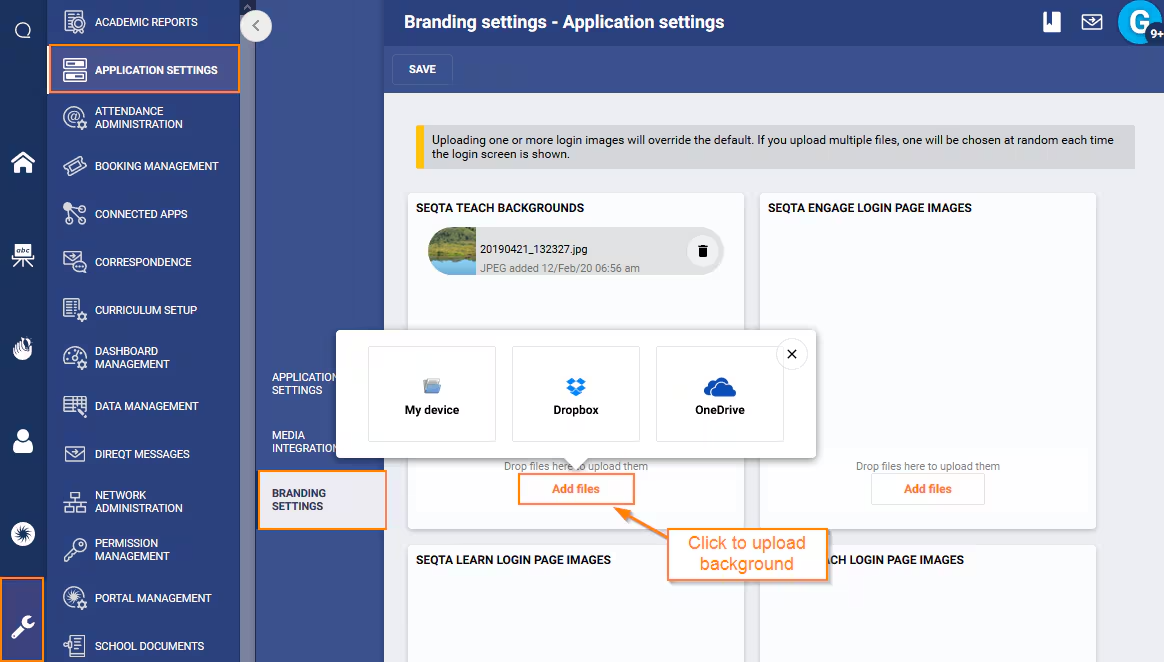
Image Quality (File Type and Size Requirements)
Please refer to the following article for information on recommended file type, file size etc. Using the recommended image format ensures the image will load quickly and the image is not blurry.
Was this article helpful?
That’s Great!
Thank you for your feedback
Sorry! We couldn't be helpful
Thank you for your feedback
Feedback sent
We appreciate your effort and will try to fix the article