This article outlines the process for sending correspondence to staff using the 'Correspondence' page.
The option to send correspondence to staff is only available if the mode 'Plain Message' is selected.
- Go to the Administration workspace > Correspondence
- Select Send SMSes, Send emails or Send direqt messages. (Not available for letters)
- Select the mode Plain message
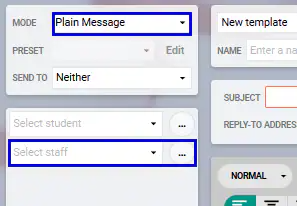
- Select staff from the drop-down or by clicking Ellipsis icon (...)
- Type a message using the editor or select a letter template
- Click the Process button at the top of the page, then YES to confirm and send the correspondence.
Was this article helpful?
That’s Great!
Thank you for your feedback
Sorry! We couldn't be helpful
Thank you for your feedback
Feedback sent
We appreciate your effort and will try to fix the article