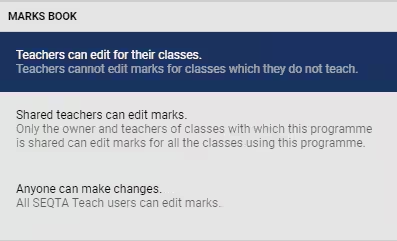
There are two settings that control edit access to Marks book:
- The Programme 'Restrictions' (see steps below) which are accessed through the Programme Cover page.
- The Admin Permission 'PROG: EDIT ALL' which can be Assigned through the Administration Workspace > Permission Management. This permission override all programme restrictions.
Changing Programme Restrictions
The option to change Programme restrictions is only available to teachers with edit rights for 'Lessons and Cover Page' or the admin permission 'PROG: EDIT ALL'.
- Go to the Teaching workspace > Timetable > My classes.
- Click the 'Load Programme' icon for the class.
- Click the 'Restrictions' button.
- Set the restriction levels as required.
- Click 'Save'.
Was this article helpful?
That’s Great!
Thank you for your feedback
Sorry! We couldn't be helpful
Thank you for your feedback
Feedback sent
We appreciate your effort and will try to fix the article