TABLE OF CONTENTS
LaTex allows the display and printing of mathematical and scientific formulas and is widely used in academia. The SEQTA editor and SEQTA Creator allow the embedding of the LaTeX syntax.
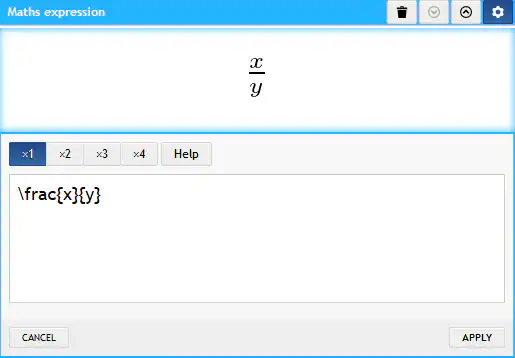
The steps for embedding LaTeX are as follows:
- Open the SEQTA Editor or SEQTA Creator
- If using the SEQTA Editor or Legacy module select Insert > Maths
- If using SEQTA Creator, click and drag the Maths expression module onto the work area
- Type in the formula and click Apply or OK
- The maths symbol should then display
Example of some of the symbols the LaTeX editor can provide.
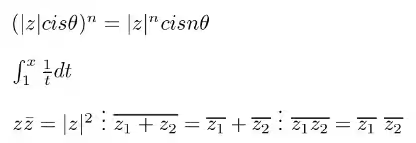
How to get a 'therefore' symbol
The default LaTeX packages don't support the \therefore symbol.
However, it is possible to create your own definition each time you need it using the following code:
\def\therefore{ \leavevmode \lower0.1ex\hbox{$\cdot$} \kern-0.15em\raise0.3ex\hbox{$\cdot$} \kern-0.15em\lower0.1ex\hbox{$\cdot$} \thinspace}So if you then do something like this:
x = y, y = z \therefore x = zIt will look like this:

Was this article helpful?
That’s Great!
Thank you for your feedback
Sorry! We couldn't be helpful
Thank you for your feedback
Feedback sent
We appreciate your effort and will try to fix the article