If feedback or results are entered for a student while the assessment availability setting is 'Date and title' or 'All details released', i.e. not 'Feedback' or 'Marks released', the option to submit work will not be available; that is, the Submissions tab will not display.
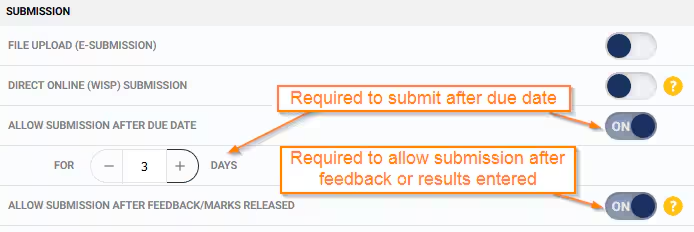
The 'Allow Submission After Feedback/Marks Released' option only applies when the assessment availability in the Availability and Dates pane is either 'Teacher feedback released' (if there is only feedback) or 'Marks Released' (if there is an assessment result or custom grade).
- Go to the Teaching Workspace > Timetable > My Day/My Classes/Traditional View.
- Click on the Load Programme icon for the class.
- Select Overview of Assessments from the sub-page menu.
- Select an existing assessment, or click the "+" to create a new assessment.
- Scroll down to the Availability and Dates pane or use the 'Jump to' drop-down in the top right-hand corner.
- Select Allow Submission After Feedback/Marks Released is selected.
- Set the Due Date.
- Set the 'Allow Submission After Due Date' and 'For n Days'setting which applies once the due-date is in the past.
- Click Save to keep the changes.
Was this article helpful?
That’s Great!
Thank you for your feedback
Sorry! We couldn't be helpful
Thank you for your feedback
Feedback sent
We appreciate your effort and will try to fix the article