In most cases, this occurs when there is a link in the Programme to SEQTA teach - note the URL in the popup will display the school's SEQTA Teach URL. Students and parents cannot authenticate with SEQTA Teach, rather only SEQTA Learn and SEQTA Engage.
This may also occur when trying to authenticate to other sites which the user is not authenticated with. If they have a username and password they can log in. If not, the link can be removed. For further assistance on links refer to this article.
To resolve this the teacher will need to remove the link. The link is likely in the COVER PAGE under the Overview. If you can't see it in there click on the 'View HTML' button in the bottom left of the editor.
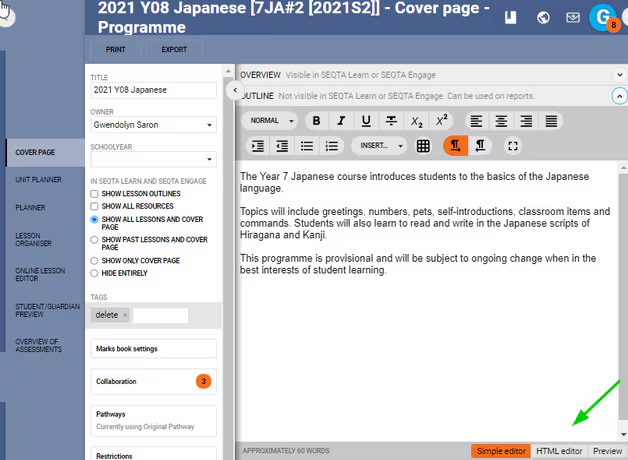
Whichever resource or link they want to add will need to be done using the 'Resource module' or the 'Legacy module' by selecting INSERT > RESOURCES from the 'Legacy module' editor toolbar.
Was this article helpful?
That’s Great!
Thank you for your feedback
Sorry! We couldn't be helpful
Thank you for your feedback
Feedback sent
We appreciate your effort and will try to fix the article