TABLE OF CONTENTS
Introduction
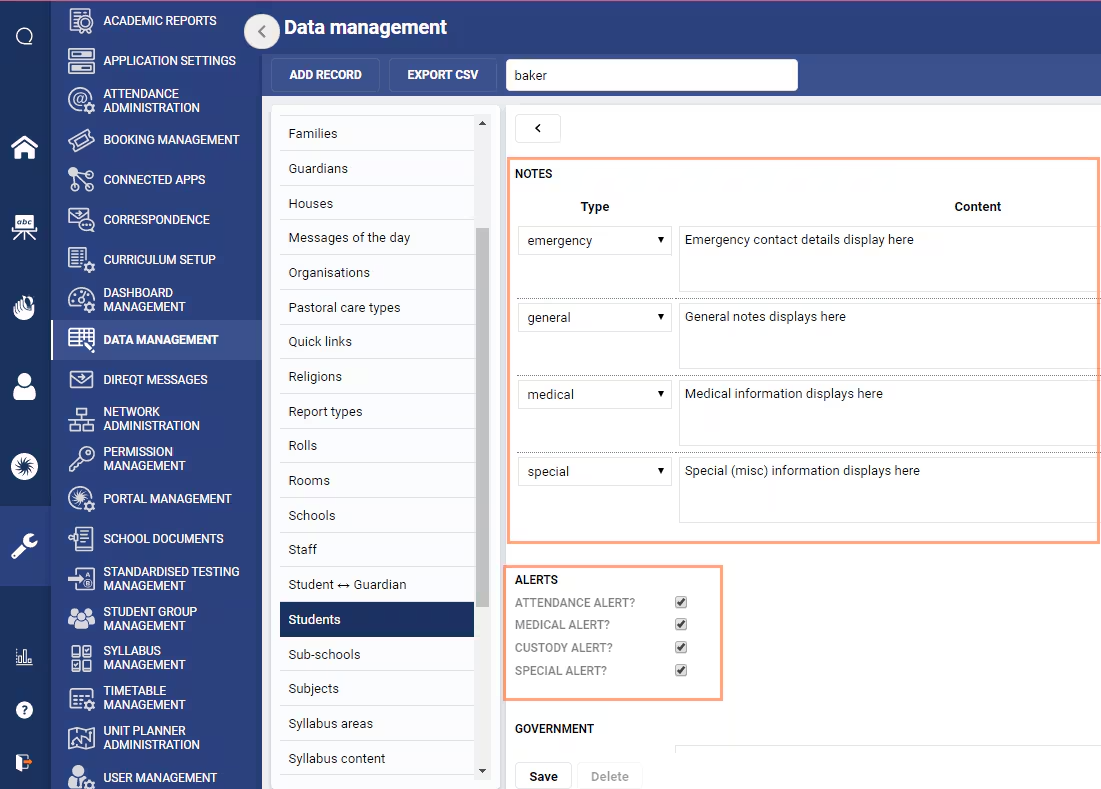
Custody, Medical and Special alerts and notes can be managed directly in SEQTA through the Data management page. This option is only suitable if the alerts and notes are not being populated by the sync (based on the information and flag settings in your school's Administration System). See Student Alert Flags for more information.
Alerts and Notes are separate fields and do not have any dependencies.
Before entering or changing any notes or alerts directly in SEQTA please ensure they are not being synced . If they are being synced, any changes made in SEQTA will be overwritten when the sync next runs.
Entering and Managing Student Alerts and Notes
- Go to the Administration Workspace > Data Management > Students.
- Use the search box to find the student record.
- Select the record to open the edit window.
- Set the alerts as required. Alerts are restricted to Attendance, Medical, Custody and Special.
- Add in any notes required. Your school may have additional note categories, but these may not be displayed anywhere other than in the Data management page.
- Click Save.
Was this article helpful?
That’s Great!
Thank you for your feedback
Sorry! We couldn't be helpful
Thank you for your feedback
Feedback sent
We appreciate your effort and will try to fix the article