TABLE OF CONTENTS
- Classes for a New Reporting Cycle (Copy, Share, Create New)
- Classes Continuing on From Another Timetable Period (Bridging)
- Programme Setup Flow Diagrams
- Programme Setup Examples
- In-House support
- Further Assistance
This article outlines the process for setting up Programmes in SEQTA Teach. The set up process is typically completed by teacher's at the start of each new timetable period. It is recommended that one person complete the Programme setup process for all classes in the cohort when sharing programmes.
Please ensure the setup method used is suitable for the school's reporting requirements. If assistance is required with this, please get in touch with our Professional Services team via the SEQTA Support portal.
Classes for a New Reporting Cycle (Copy, Share, Create New)
Classes at the start of a new timetable cycle (calendar year or academic year), will require either a new Programme be set up, or a copy of an existing Programme. Once a new or copy of a Programme has been set up on the new class, it will then need to be shared with other classes in the cohort. Ensure that the programme is fully configured before sharing to other classes. Rotating classes may or may not require bridging depending on the school's reporting requirements.
Classes Continuing on From Another Timetable Period (Bridging)
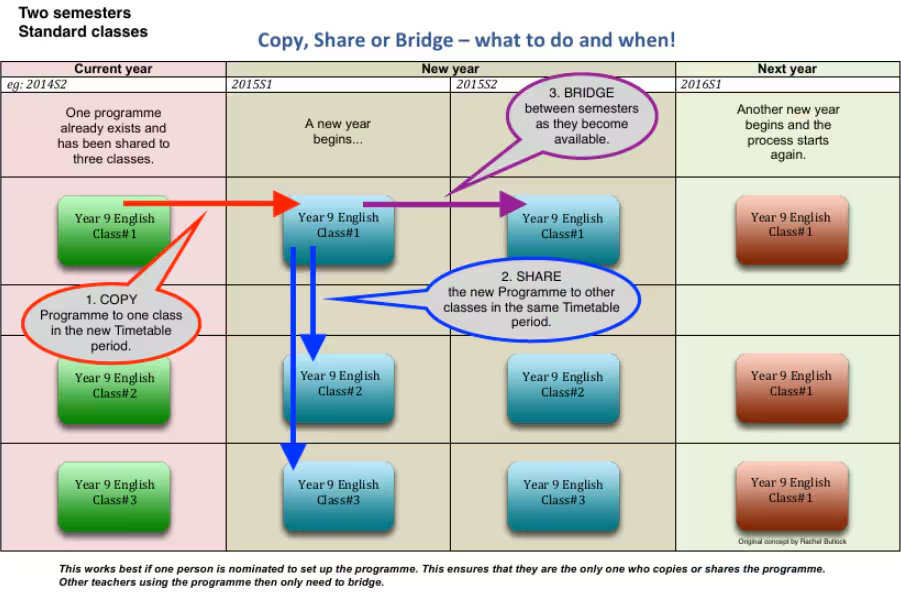
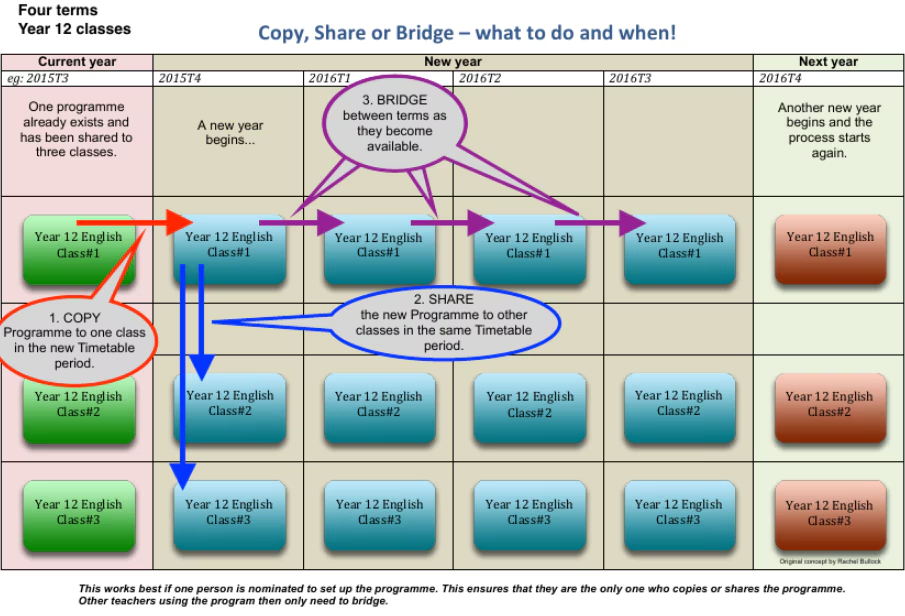
Classes continuing on from another timetable period are typically bridged. This process will carry forward the Programme into the new timetable period. Where there are multiple classes sharing a Programme, all classes need to be bridged independently.
Programme Setup Flow Diagrams
The flow diagrams below outline the programme setup process for semester based timetables and term based timetables.
Classes Timetabled on a Semester Basis
Classes timetabled on a Term Basis.
Programme Setup Examples
| Scenario | Example | Programme Setup | Copy or Create | Share | Pathways |
| There are multiple classes for the same subject. However, they are reported on separately. Typically this method is used for streamed classes and music classes. | There are five Year 7 General English classes, and two Year 7 Ext English classes. The General and Ext English classes are reported on separately. | Two Programmes required. One for the five General English classes, and another for the Ext class. | Copy or create two Programmes. | Share each programme to its respective classes. | Optional |
| Each class works from a different Programme. A copy of an existing Programme is used. This may be to ensure all classes use the same Programme structure (assessments etc.). | Musical instruments are reported on separately for Music reports (eg: trumpet, flute, voice). There is only one class taught for each instrument. Comments, assessment structure and affectives are different for each instrument. | Multiple programmes required. One for each instrument. | Copy or create multiple programmes | No | Optional |
In-House support
The SEC (School Education Contact) at your school should have completed the SEQTA Teach curriculum training to allow them to provide in-house support for teachers. If unsure as to who the SEC is, or if the SEC is unable to provide assistance, please contact the SEQTA Support team via the Help portal. The Support team might direct you to the Professional Services team depending on the circumstances.
Further Assistance
The SEQTA Support Team is available to assist with troubleshooting Programme set up issues. Please note that the Programme set up process may differ from school-to-school, based on the school's reporting requirements. As such, some queries may be directed toward the School's SEQTA Support Staff or the SEQTA Professional Services team.
Related articles:
Was this article helpful?
That’s Great!
Thank you for your feedback
Sorry! We couldn't be helpful
Thank you for your feedback
Feedback sent
We appreciate your effort and will try to fix the article