TABLE OF CONTENTS
Introduction
Generative AI is an exciting new field, and like any new technology its impact is still being assessed. When using SEQTA AI Assist, you will need to comply with your local cybersafety and privacy legislation, as well as any policies your organisation has in place.
SEQTA AI Assist currently includes the following functionality:
Personally Identifiable Information
SEQTA AI Assist does not communicate any PII (Personally Identifiable Information) with the AI components that draft the lesson plans. To protect the privacy of students and staff, it is important to never include any PII in the SEQTA AI Assist editable fields, such as Essential Learning or Additional Details.
Further Privacy Information
For further information about how Tes protects and processes customer and personal data, please refer to the Tes General Terms of Business, Tes Data Processing Agreement, and Tes Privacy Notice. These documents provide broader information about customer data ownership, data protection, security measures, sub-processors, international processing and retention obligations.
Accuracy
Generative AI is a new technology and improving every day. However, it can supply inaccurate information. SEQTA AI Assist uses AI to generate a draft lesson plan. It is important to check the accuracy of the content delivered, as well as use your professional discernment on the appropriateness of the plan for your intended lesson. Particular attention to any links or videos that the AI service may supply is recommended, as they may not be relevant nor appropriate for your students.
Configuration
SEQTA AI Assist is available to all schools as part of their standard subscription to SEQTA. Using this functionality does not incur an additional cost.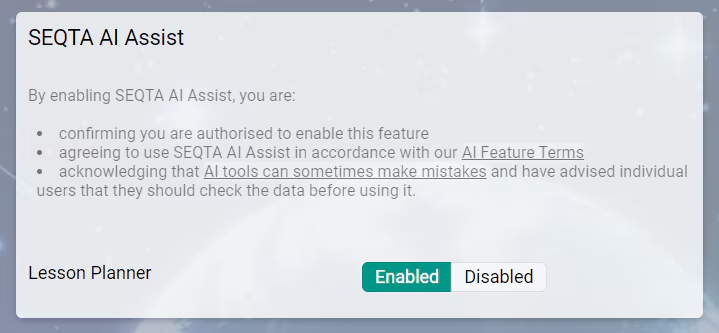
SEQTA AI Assist can be enabled for your school through the settings pane as shown above. Go to Administration workspace>Application Settings>Application settings. To find the pane, search for AI assist in the search box in the top-right corner. The permission 'DATA: EDIT' is required to access the Application settings.
A school is able to enable or disable the AI Assist functionality at any time. Enabling SEQTA AI Assist will make it available to all users who have permission to edit Programmes. Details on managing Permission groups can be found in this article: Creating, Managing and Deleting Permission Groups.
Please note:
Some schools lock down outbound connections. This may affect SEQTA AI for Lesson Plans.
If you're getting errors when trying to generate a draft lesson plan, then try opening the following Testing URL https://ai.seqta.com/connect in your browser. This is a testing service only.
- If you see the text OK (look for small text in the top-left corner of the browser window), then your outbound connection is working as expected. If SEQTA AI Assist for Lesson Plans is still returning errors please contact the SEQTA Support team via the Help portal for assistance, noting the specific time you received an error.
- If you don't get an OK then it's possible the outbound connection is locked down. Talk to your IT team and request they whitelist the domain ai.seqta.com.
Was this article helpful?
That’s Great!
Thank you for your feedback
Sorry! We couldn't be helpful
Thank you for your feedback
Feedback sent
We appreciate your effort and will try to fix the article